TL;DR:
- Enterprise marketing teams face workflow fragmentation that causes delays and revenue loss across campaign planning, execution, and analysis. Implementing connected systems, clear roles, templates, and automation reduces approval cycles, accelerates launches, and improves ROI. A unified information architecture that integrates collaboration, data, and processes is essential for scalable, efficient digital marketing operations.
Enterprise marketing teams run dozens of campaigns simultaneously across multiple channels, regions, and approval hierarchies, and the cracks in a poorly structured digital marketing campaign workflow show up fast. Missed deadlines, redundant revision cycles, disconnected reporting tools, and unclear sign-off responsibilities all compound into measurable revenue loss. This guide walks you through every stage of building a workflow that connects planning, execution, and performance analysis into one coherent process, so your campaigns launch faster, perform better, and generate stronger ROI at scale.
Table of Contents
- Understanding the digital marketing campaign workflow lifecycle
- Preparing for a campaign workflow: tools, templates, and roles
- Executing your digital marketing campaigns efficiently using automation
- Measuring, analysing, and optimising campaign performance for better ROI
- Rethinking campaign workflows: beyond process to connected collaboration
- Streamline your digital marketing campaign workflows with CloudFusion
- Frequently asked questions
Key Takeaways
| Point | Details |
|---|---|
| Comprehensive workflow lifecycle | Digital marketing campaigns succeed with integrated planning, execution, and performance tracking cycles. |
| Standardise approvals and roles | Locked templates and clear approval hierarchies reduce bottlenecks and ensure brand compliance. |
| Leverage smart automation | Workflow automation accelerates task routing, approvals, and complex campaign orchestration effectively. |
| Connect data to strategy | Linking performance data back to planning improves decision-making and campaign ROI. |
| Collaborative, connected platforms | Unified systems that integrate context, approvals, and performance reduce rework and improve agility. |
Understanding the digital marketing campaign workflow lifecycle
Before you can fix what is broken, you need a clear picture of what a complete campaign workflow actually looks like. Most enterprise teams inherit fragmented processes where planning happens in spreadsheets, execution runs through email threads, and performance reporting lives in a separate analytics tool that nobody updates in time to influence the next campaign. That fragmentation is the root cause of most campaign inefficiencies.
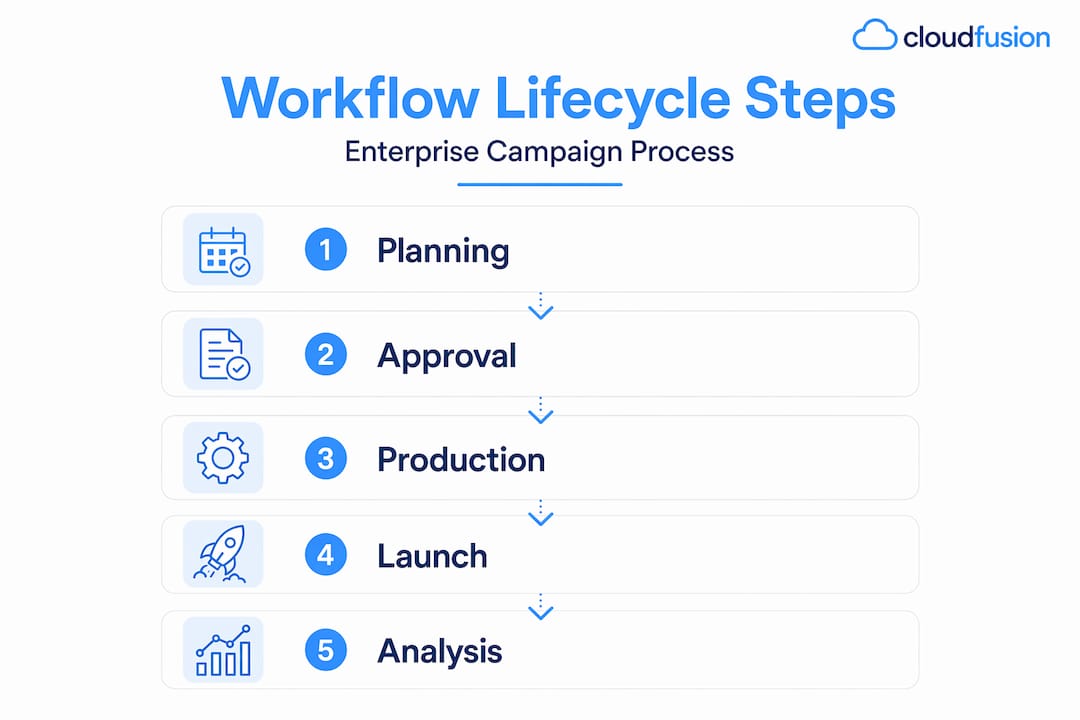
Digital campaign management workflows are described as three core activities: planning, execution, and performance analysis, looping back to optimise based on what worked. The cyclical nature is the part most teams ignore. They treat performance review as a post-mortem rather than as the input that shapes the next campaign plan.
Here is how each phase breaks down in practice:
- Planning: Define campaign goals using measurable KPIs, identify your target audience segments, select channels, assign budgets, and document all required deliverables with due dates. This phase must also confirm who approves what, before a single asset goes into production.
- Execution: Create content and assets according to locked brand templates, route them through structured approval chains, and launch across channels in a coordinated sequence. Multi-channel campaigns that launch in isolation — where the social team does not know what the email team is sending — fragment the audience experience and dilute impact.
- Performance analysis: Track engagement rates, conversion metrics, approval cycle times, and cost per acquisition against the targets set during planning. Findings feed directly back into the planning phase to sharpen the next campaign.
Understanding this lifecycle is the foundation for every optimisation decision that follows. Reviewing enterprise digital marketing strategies alongside this framework gives you additional context on how large organisations align campaign operations to broader growth objectives.
Preparing for a campaign workflow: tools, templates, and roles
With the lifecycle clear, the next priority is infrastructure. A campaign workflow is only as reliable as the systems and role definitions supporting it. This is where most enterprise teams underinvest, assuming that good creative work compensates for unclear process, when in reality it just generates more revision cycles.
Marketing approval workflows break at scale when ownership is unclear, briefs are vague, and content volume outpaces the team reviewing it. The fix requires three structural changes: locked templates, defined roles, and integrated approval routing.
Roles every campaign workflow needs:
- Requester: The person or team submitting a campaign brief.
- Designer or content creator: Responsible for producing the asset to specification.
- Brand lead: Reviews for consistency with brand guidelines before legal or compliance sees it.
- Compliance or legal reviewer: Required for regulated industries or campaigns making claims that carry legal risk.
- Final approver: Usually a marketing director or campaign manager who gives the green light to launch.
Choosing the right approval structure:
| Approval type | How it works | Best for |
|---|---|---|
| Sequential | Each reviewer completes before the next begins | High-risk or regulated content |
| Parallel | All reviewers review simultaneously | Low-risk, fast-turnaround campaigns |
| Hybrid | Critical reviewers run sequentially; others run in parallel | Most enterprise campaigns |
Locked templates serve a purpose that goes beyond brand consistency. When designers start from a constrained template rather than a blank canvas, you eliminate an entire category of revision requests related to font sizes, colour usage, and logo placement. That alone can cut your average approval cycle by one to two rounds.
Pro Tip: Conduct quarterly audits of your approval workflow to identify which reviewer roles consistently cause delays. If compliance reviews are the bottleneck, consider pre-approval of template categories so that only campaigns deviating from approved formats need full legal review.
Integrating your campaign planning tools with your approval management system is the next step. When these systems are disconnected, reviewers work without campaign context, which is why you receive feedback like “what is this for?” on assets that have a clear brief attached. Tools that support automation in digital marketing can bridge this gap by automatically routing assets to the right reviewers with brief context attached.
Executing your digital marketing campaigns efficiently using automation
A well-prepared workflow still requires execution discipline. This is where marketing automation platforms transition from a nice-to-have to a genuine operational necessity for enterprise teams managing campaigns across multiple channels and time zones.

Modern marketing workflow automation platforms codify marketing processes into configurable workflows that automatically route tasks, enforce approval hierarchies, manage dependencies, and provide real-time campaign visibility, reducing launch times by up to 60%. That figure reflects what happens when you remove manual handoffs from a process that runs the same steps every single campaign.
Steps to set up a marketing automation workflow:
- Define your processes in writing — document every task, decision point, and approval gate before touching any software.
- Design the workflow visually — use a visual workflow designer to map task sequences, parallel paths, and escalation rules without writing code.
- Assign roles and permissions — match each workflow step to a named role, not an individual, so the workflow survives team changes.
- Implement integrations — connect your automation platform to your digital asset management (DAM) system, CRM, and project management tool.
- Test with a live campaign — run one real campaign through the automated workflow before full rollout, documenting where tasks stall or escalate unexpectedly.
- Monitor and adjust — review workflow performance metrics weekly during the first month to catch routing errors early.
Impact of automation on key campaign metrics:
| Metric | Before automation | After automation | Improvement |
|---|---|---|---|
| Average campaign launch time | 18 days | 7 days | 61% faster |
| Approval cycles per asset | 3.4 rounds | 1.8 rounds | 47% reduction |
| Error or rework rate | 22% of assets | 8% of assets | 64% reduction |
| Team productivity (campaigns per quarter) | 12 | 19 | 58% increase |
A dedicated marketing workflow automation platform can serve as the orchestration layer connecting these systems, particularly for teams running automated marketing campaigns across email, paid media, and social simultaneously.
Pro Tip: Use visual workflow designers that allow non-technical marketing operations staff to update process templates without developer involvement. When updating a workflow requires a code change, iterations slow to the pace of your IT queue rather than your campaign calendar.
The AI in digital marketing space is also adding intelligent routing capabilities where platforms can predict approval bottlenecks before they occur and reassign tasks proactively. This is worth evaluating as you scale.
Measuring, analysing, and optimising campaign performance for better ROI
Execution without measurement is operational activity without business value. Your digital marketing analytics workflow must be built into the campaign from the planning phase, not bolted on after launch as an afterthought.
Performance data should be connected to campaign planning and execution from the beginning, not treated as separate reporting. This linked approach allows teams to compare intended versus actual outcomes and identify precisely where the gap occurred.
Key metrics to track across your campaign workflow:
- Engagement rates — clicks, opens, video views, and time on page per channel
- Conversion rates — by channel, audience segment, and creative variant
- Approval cycle time — how long each asset takes from submission to sign-off
- First-time approval rate — the percentage of assets approved without revision requests
- Cost per acquisition — actual versus planned, broken down by campaign phase
- Campaign launch variance — actual launch date versus planned launch date
Common data sources to integrate:
- CRM data for lead quality and revenue attribution
- Channel analytics platforms for engagement and conversion data
- Workflow management systems for approval cycle and rework metrics
- Finance systems for budget versus actual spend comparison
Optimisation tactics that drive measurable ROI improvement:
- Run structured A/B tests on subject lines, creative formats, and CTAs, then feed results back into the next campaign brief
- Identify your highest first-time approval rate asset categories and turn them into template standards
- Use campaign launch variance data to improve timeline estimates in future planning phases
“Treating performance data as a standalone report rather than as an input to the next planning cycle is the single most common reason enterprise campaigns repeat the same mistakes quarter after quarter.”
Measuring digital marketing ROI effectively requires connecting your campaign management data to your revenue attribution model. Without that link, you are measuring activity rather than business outcomes.
Rethinking campaign workflows: beyond process to connected collaboration
Here is the uncomfortable reality most workflow guides avoid saying clearly: the majority of enterprise campaign workflow problems are not process problems. They are collaboration and context problems dressed up as process problems.
Teams invest in workflow management software, approval tools, and automation platforms, then find that campaigns still stall, creative still gets reworked excessively, and performance data still does not inform planning. The cause is almost always that the systems do not share context. The approval reviewer does not see the campaign brief. The performance analyst does not have visibility into which version of an asset ran. The planning team does not know that the previous campaign’s creative was revised four times because the brief was ambiguous.
The biggest time sink in enterprise campaign operations is operational handoffs between planning, production, approvals, activation, and measurement. Systems that keep creative context and governance tied to deliverables cut rework and accelerate launches. That is the architecture most enterprises are not building.
Our perspective is that the real gain comes from treating your campaign workflow as a single connected information system rather than a series of handoffs between departments. When the brief, the asset, the approval history, and the performance data all live in one connected environment, your team stops asking “where is this?” and starts asking “how do we make this better?”
Enterprise marketing strategies that perform consistently share one characteristic: the teams executing them have a single source of truth that connects strategy to execution to results. This is not a technology purchase. It is an architecture decision that starts with how you design your workflow.
Implement human-in-the-loop gates at critical decision points within your automation, particularly for audience targeting decisions and budget allocation changes. Automation accelerates the repeatable steps; your team’s judgement should still govern the decisions that carry the highest commercial risk.
Streamline your digital marketing campaign workflows with CloudFusion
Building a connected, automated campaign workflow requires more than the right strategy. It requires technology that is configured for your specific approval structures, team hierarchy, and reporting needs. At CloudFusion, we build custom web development solutions and mobile app development services that integrate directly with your marketing operations, connecting planning tools, approval workflows, and performance dashboards into a single environment. Our team understands the South African enterprise context, including rand-based budget management and local compliance requirements, giving you solutions that fit your actual operating environment. Backed by secure web hosting packages and a full suite of digital services, we help marketing teams reduce campaign launch times, eliminate approval bottlenecks, and build the data connections that turn performance insights into better campaigns.
Frequently asked questions
What is a digital marketing campaign workflow?
A digital marketing campaign workflow is a structured process that guides campaigns through planning, execution, and performance tracking to produce consistent, efficient results. Campaign management workflows cover three core activities — planning, implementation, and performance analysis — cycling continuously to improve outcomes.
How can marketing automation improve campaign workflows?
Marketing automation triggers cross-channel actions based on customer behaviour, lifecycle stage, or time, removing manual tracking and reducing execution effort across large, complex campaign programmes.
Why are approval workflows critical in digital marketing campaigns?
Approval workflows ensure brand consistency, legal compliance, and timely asset sign-offs, preventing costly errors and launch delays. Locked templates and role-based permissions reduce review load and keep campaigns moving at scale.
What common mistakes slow down digital marketing campaign workflows?
Vague briefs, undefined reviewer roles, overlapping automation rules, and disconnected planning and analytics systems are the most frequent causes of delays. Too many similar workflows in automation systems also create lead routing errors and data inconsistencies that require manual intervention to resolve.
Recommended