

What Is UX and UI? Complete Guide for Businesses
What is UX and UI? This comprehensive guide covers core definitions, key differences, business benefits, real-world examples, and industry best practices.
Start reading
UX and UI help people understand a digital product and complete the work they came to do. Useful design starts with the task, then checks whether the interface helps or gets in the way.
Key Takeaways
Point | Details |
|---|---|
Importance of UX and UI | Both UX and UI are essential for creating effective digital products; they must work together to provide meaningful experiences. |
Investment Returns | Investing in UX and UI can yield significant financial benefits, including higher conversion rates and increased customer satisfaction. |
Common Misconceptions | Many misconceptions about UX and UI can hinder digital strategies; it’s crucial to understand that these are ongoing processes rather than one-time tasks. |
Best Practices for Success | Effective UX/UI requires continuous user research, testing, and commitment to accessibility and performance optimization. |
Table of Contents
- Defining Ux And Ui In Digital Design
- Key Differences Between Ux And Ui
- Benefits Of Ux And Ui For Businesses
- Common Ux And Ui Misconceptions
- Best Practices And Real-World Examples
Defining UX and UI in Digital Design
User Experience (UX) and User Interface (UI) represent two critical yet distinct aspects of digital design that are fundamental for businesses seeking to create compelling digital products and services. UX design is a comprehensive process focused on understanding and improving how users interact with a company’s digital offerings, driven by meticulous research, data analysis, and continuous testing.
According to research from UX Matters, UX encompasses the practical and functional aspects of a product, exploring the holistic user interaction beyond mere visual aesthetics. This means UX designers dive deep into understanding user needs, pain points, and behavioural patterns to create intuitive and meaningful experiences. Learn more about user experience design in our comprehensive guide on UX design.
In contrast, User Interface (UI) design concentrates specifically on the visual and interactive elements of a digital product. UI designers craft the look, feel, and layout of digital interfaces, ensuring they are not just aesthetically pleasing but also aligned with brand identity and user expectations. Key UI elements include:
- Colour schemes and typography
- Button and interactive element design
- Visual hierarchy and layout
- Responsive design principles
- Brand-consistent visual language
The true magic happens when UX and UI work together seamlessly.

While UX ensures the product meets user needs functionally, UI makes that functionality visually engaging and intuitive. For businesses, understanding and investing in both UX and UI is no longer optional—it’s a strategic imperative for digital success.
Key Differences Between UX and UI
User Experience (UX) and User Interface (UI) might sound similar, but they represent distinctly different approaches to digital design. According to research from UX Matters, the primary difference lies in their fundamental focus and methodology. UX is a comprehensive strategy that explores the entire user journey, while UI concentrates specifically on visual design elements.
According to research from Wikipedia, UX design encompasses a broader spectrum of considerations including usability, accessibility, brand perception, and overall content strategy. In contrast, UI is primarily concerned with the visual front end of a digital product. Explore our deeper guide on embracing user experience design.
Let’s break down the key differences in a comparative format:
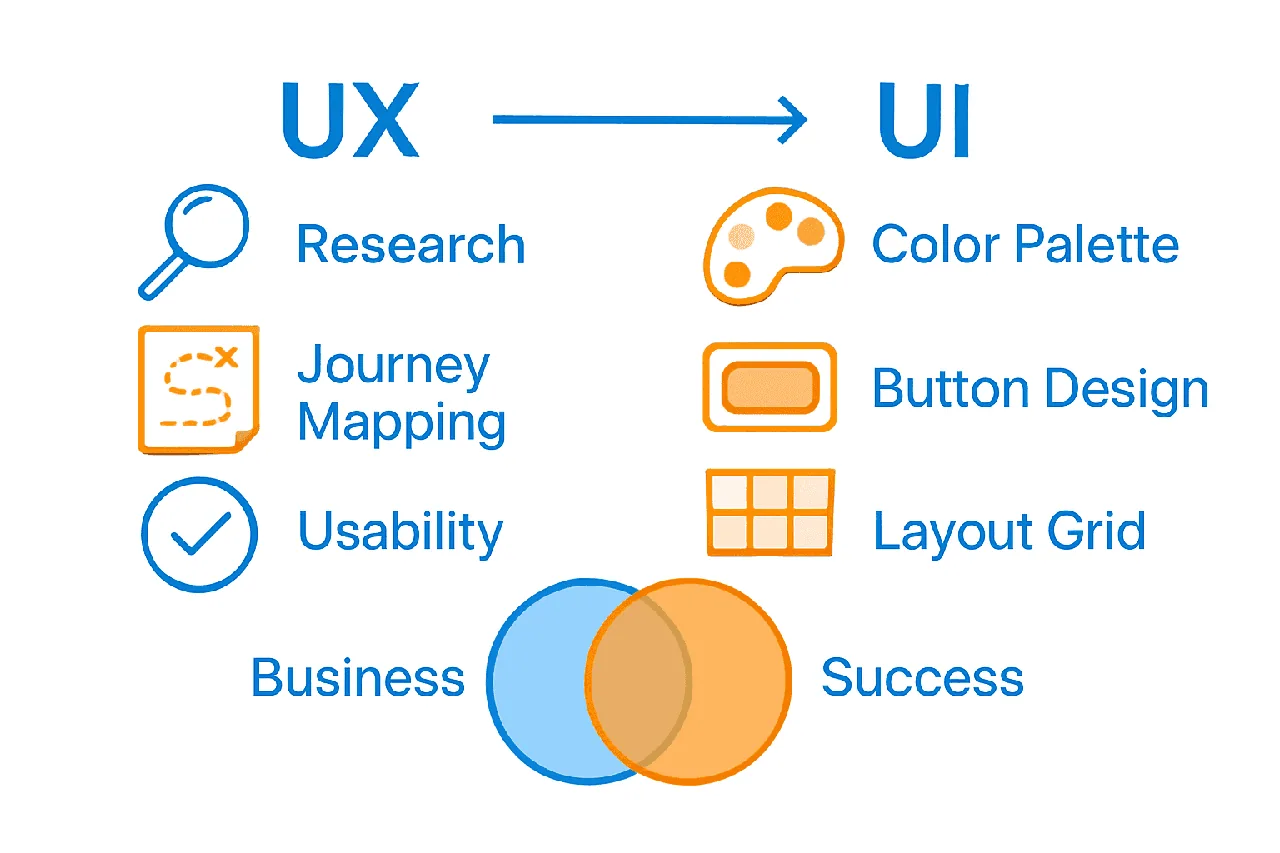
Here’s a comparison of the defining characteristics of UX and UI design:
Aspect | UX Design | UI Design |
|---|---|---|
Primary Focus | User journey & experience | Visual layout & presentation |
Activities | Research | Visual design |
Success Measures | Usability | Visual appeal |
Strategy | Holistic & functional | Aesthetic & interactive |
UX Design Characteristics:
- Focuses on overall user interaction and experience
- Driven by extensive research and user testing
- Solves complex user problems
- Considers entire user journey
- Prioritises functional effectiveness
UI Design Characteristics:
- Concentrates on visual and aesthetic elements
- Creates visual storytelling through design
- Develops interactive interface components
- Ensures consistent visual brand representation
- Translates UX research into visual solutions
The synergy between UX and UI is crucial. While UX provides the strategic blueprint of how users will interact with a product, UI transforms that blueprint into a visually compelling and intuitive interface. For businesses, understanding these nuanced differences can significantly impact digital product success.
Benefits of UX and UI for Businesses
Investing in User Experience (UX) and User Interface (UI) isn’t just a design choice—it’s a strategic business imperative with remarkable financial implications. Research from UX Matters reveals that well-designed digital experiences can dramatically transform a company’s bottom line, offering substantial returns on investment that extend far beyond aesthetic improvements.
Assess design through the outcomes that matter to your business. Useful measures to consider include:
Financial Benefits:
- Improve task completion and assess conversion through your own measurements
- Reduce customer support costs
- Increase customer satisfaction and retention
- Enhance cross-selling opportunities
- Improve overall revenue generation
Moreover, strategic UX and UI design helps businesses catch potential usability issues early, reducing time and cost spent on troubleshooting. By finding the optimal balance between budget, time, and output, companies can create digital products that not only look great but also function seamlessly. The combination of intuitive design and visual appeal creates a powerful user experience that can significantly differentiate a business in today’s competitive digital landscape.
Common UX and UI Misconceptions
User Experience (UX) and User Interface (UI) design are often misunderstood, with many businesses holding onto outdated or incorrect beliefs that can significantly hinder their digital strategy. Understanding and dispelling these misconceptions is crucial for creating truly effective digital experiences.
Learn more about best practices in web design, especially regarding common myths that can derail digital projects. According to research from design experts, several persistent misconceptions plague UX and UI development:
Common UX/UI Myths:
- The 3-Click Rule: Contrary to popular belief, there’s no proven correlation between site success and limiting user interactions to three clicks
- More Choices Equal Better UX: Additional options often lead to decision paralysis rather than improved user experience
- Animations Always Delight Users: Excessive or poorly implemented animations can distract and degrade user interaction
- UX Extends Project Timelines: In reality, UX can streamline development by providing clarity and early validation
- Design is Purely Aesthetic: UX/UI is fundamentally about solving user problems, not just making things look pretty
The most dangerous misconception is treating UX and UI as a one-time task rather than an ongoing process of user understanding and continuous improvement. Successful digital experiences require constant iteration, user feedback, and a deep commitment to solving real user challenges.
Best Practices and Real-World Examples
User Experience (UX) and User Interface (UI) design are not just theoretical concepts but practical strategies that can transform digital interactions. Successful implementation requires a holistic approach that combines empathy, technical skill, and continuous user-centric refinement.
Effective UX/UI design demands several critical best practices. Explore our comprehensive guide to web design best practices to understand how top digital experiences are crafted:
Key UX/UI Best Practices:
- User Research: Conduct in-depth user interviews and surveys
- Prototype and Test: Create multiple design iterations
- Accessibility First: Ensure designs work for all users
- Performance Optimization: Prioritise speed and responsiveness
- Consistent Design Language: Maintain visual and interactive coherence
Real-world examples demonstrate these principles in action. Companies like Apple and Airbnb excel by prioritising intuitive design that solves user problems elegantly. Their interfaces aren’t just visually appealing—they’re carefully engineered experiences that anticipate and resolve user needs before they become frustrations. Successful UX/UI isn’t about creating beautiful screens, but about understanding human behaviour and translating that insight into seamless digital interactions.
Elevate Your Business With UX and UI Innovation
Have you ever felt frustrated by a digital experience that simply does not work for your business or your customers? As highlighted in our article, UX and UI are more than just industry buzzwords—they are the cornerstones of seamless digital engagement and conversion. Many businesses struggle with confusing interfaces, poor usability, and lost opportunities because their digital products do not reflect real user needs or deliver consistent value. If you recognise the importance of user research and beautiful, functional design, you know these challenges can hold your growth back and waste costly development time.
UX and UI decisions should start with the information and tasks people need from your website. Discuss the website experience with Cloudfusion so the structure, interface and checks can be planned together.
Frequently Asked Questions
What is the difference between UX and UI design?
UX design focuses on the overall user experience and journey, aiming to solve user problems thoughtfully, while UI design concentrates on the visual elements and aesthetics of a digital product, ensuring a visually appealing and intuitive interface.
Why is investing in UX and UI important for businesses?
Investing in UX and UI is crucial as it can significantly enhance user satisfaction, increase conversion rates, reduce support costs, and ultimately boost revenue. A well-designed user experience can yield substantial returns on investment.
How can businesses ensure effective UX/UI design?
Businesses can ensure effective UX/UI design by conducting user research, creating prototypes, testing designs, prioritizing accessibility, and maintaining a consistent design language throughout their digital products.
What are some common misconceptions about UX and UI design?
Common misconceptions include the belief that design is purely aesthetic, that more choices enhance user experience, and that UX design extends project timelines. In reality, successful UX/UI design is an ongoing process focused on solving user problems and optimizing interactions.