What Is UX and UI? Complete Guide for Businesses
A practical interface checklist for forms, navigation, keyboard access and feedback. Test real tasks and verify changes before claiming better conversion.
Start reading
GUIDANCE REVIEWED BY CLOUDFUSION ·
UX and UI Checklist: Testing Forms, Navigation and Feedback
Use this checklist on a task that matters, such as sending an enquiry or placing an order. Follow the task from its starting point to its confirmation, then repeat it on the devices and input methods your customers use.
Check the route and labels
Make links describe their destination and buttons describe the action. Use “Next” for a step that continues and a specific label for the final submission. Confirm that back navigation preserves information where it should.
Check errors, empty states, unavailable items and slow responses. A visitor should know what happened and what they can do next, rather than guessing whether the action worked.
Check keyboard, touch and assistive technology
Complete the task with a keyboard. Check focus visibility, logical order, labels and that dialogs return focus when closed. Repeat with touch and test at enlarged text sizes. A working mouse interaction alone is not enough.
The W3C ARIA Authoring Practices Guide explains expected behaviour for common patterns. Use native controls where they suit the task and verify the implementation rather than assuming an accessibility attribute makes it accessible.
Check stability and the actual outcome
Reserve space for images and avoid moving the action while a page loads. Check load speed, responsiveness and layout stability. Core Web Vitals measure these aspects; lab tests and field measurements describe different conditions.
Verify that the completed action reaches its destination, such as an enquiry receipt or paid order. Compare the same task before and after changes and record the evidence for any claimed improvement.
The guide below was originally published 21 October 2025. Unsourced numerical and research claims were corrected during this review.
UX and UI design help people find their way through a digital task. Clear labels, useful feedback and accessible controls need to be tested in context; there is no universal conversion increase from applying them.
Key Takeaways
| Point | Details |
|---|---|
| Understanding UX and UI | UX focuses on the overall user journey, while UI focuses on the visual and interactive elements of that journey. Employing both strategies creates more impactful digital products. |
| Core Principles of Design | Effective UX/UI design relies on user-centricity, accessibility, and simplicity to enhance user engagement and satisfaction. Prioritize these principles to drive positive outcomes. |
| Business Impact | Investing in thoughtful UX and UI design is critical for improving user engagement, conversion rates, and overall business performance. Recognize design as a key business strategy. |
| Avoiding Design Pitfalls | Be mindful of common design traps such as dark patterns and cognitive overload. Adopting a transparent and user-focused design approach can help maintain trust and enhance user experience. |
Table of Contents
- Defining Ux And Ui Fundamentals
- Differences Between Ux And Ui Design
- Core Principles Of Effective Ux And Ui
- Business Impact And Real-World Applications
- Common Pitfalls And How To Avoid Them
Defining UX and UI Fundamentals
User Experience (UX) and User Interface (UI) are foundational design disciplines that shape how people interact with digital products, but they’re often misunderstood. UX design is a holistic, user-centered approach that goes far beyond mere aesthetics, focusing on creating meaningful and seamless interactions between users and products. According to research from Wikipedia, UX design encompasses critical elements like usability, usefulness, desirability, brand perception, and overall performance.
At its core, UX is driven by comprehensive research, data analysis, and continuous testing. It’s not about making something look pretty, but understanding user needs, pain points, and creating solutions that genuinely solve problems. The goal is to craft an experience so intuitive that users barely notice the underlying complexity.
 Designers map out user journeys, conduct extensive user research, and iterate designs to ensure maximum engagement and satisfaction.
User Interface (UI) design complements UX by focusing specifically on the visual and interactive elements users directly encounter. As outlined in Wikipedia’s UI definition, UI aims to maximize usability through strategic communication of information via visual hierarchy and interactive elements. This means carefully designing:
- Information architecture
- Visual design elements
- Interactive touchpoints
- Navigation structures
- Responsive layout principles
While UX determines the overall experience, UI determines how that experience looks and feels. Think of UX as the blueprint and UI as the actual construction and interior design of a digital product. For businesses, understanding this distinction is crucial in creating digital solutions that not only look great but also deliver genuine value to users.
For a deeper exploration of UX principles, check out our guide on UX design.
Differences Between UX and UI Design
User Experience (UX) and User Interface (UI) might sound similar, but they play distinctly different roles in digital product design. According to research from Wikipedia, UX encompasses the entire spectrum of a user’s interaction with a company and its products, including emotional responses and overall experience, while UI focuses specifically on the design of interfaces and their visual construction.
Think of UX as the complete journey and UI as the vehicle that carries users through that journey. UX designers are like strategic architects who map out the entire user experience, considering aspects like:
- User research and insights
- Product functionality
- User satisfaction and emotional engagement
- Problem-solving approaches
- End-to-end interaction flow
UI designers, by contrast, are the visual designers who create the actual interface. As outlined in Wikipedia’s UI definition, their primary focus is crafting the visual and interactive layer that users directly engage with. They’re responsible for:
- Creating visual design elements
- Developing interactive interfaces
- Ensuring visual consistency
- Designing intuitive navigation systems
- Translating user experience strategies into tangible visual solutions
A practical analogy might help: UX is like the blueprint of a house that determines the layout, flow, and functionality, while UI is the interior design that makes the house visually appealing and comfortable to live in. In digital products, UX ensures the product solves user problems effectively, and UI ensures it does so in a beautiful, engaging manner.
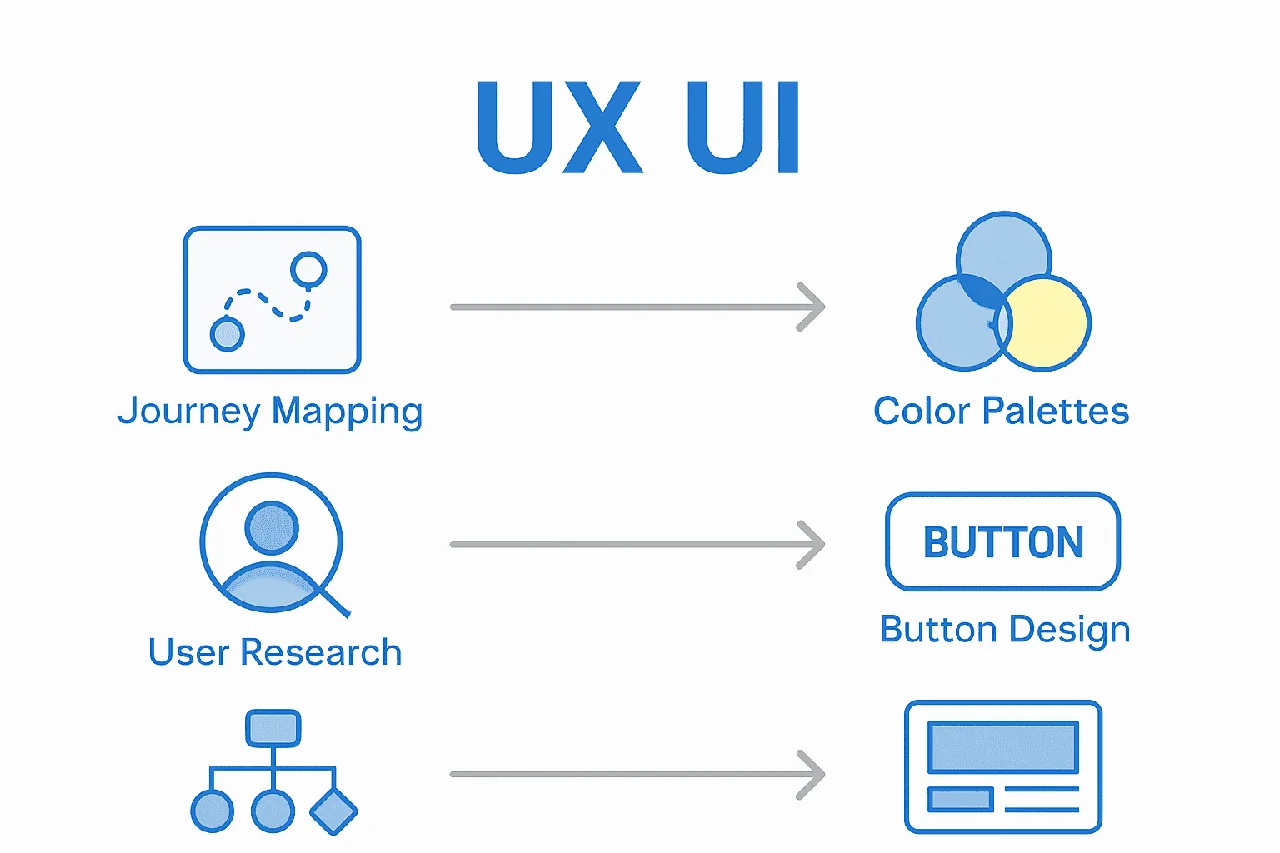
Here’s a structured comparison of UX and UI design roles:
| Aspect | UX Design | UI Design |
|---|---|---|
| Primary Focus | User journey Problem-solving Emotional engagement |
Visual design Interactivity Interface elements |
| Core Activities | User research Mapping user flow Testing & iteration |
Designing layouts Creating visual elements Ensuring consistency |
| Key Principles | Usability Accessibility User satisfaction |
Visual hierarchy Simplicity Responsiveness |
| Responsible For | Overall experience User needs Functionality |
Look and feel Navigation Brand consistency |
| Example Output | Wireframes User flows Personas |
Buttons Colour schemes Typography |
For businesses, understanding this nuanced difference means investing in both strategic experience design and beautiful, functional interfaces to create truly compelling digital products.
Core Principles of Effective UX and UI
User Experience (UX) and User Interface (UI) design are not just about making things look good—they’re about creating intuitive, functional digital experiences that solve real problems. According to research from the design industry, successful design is rooted in several core principles that transform digital products from mere interfaces to meaningful solutions.
At the heart of effective UX design are fundamental principles like user-centricity, accessibility, and continuous improvement. This means:
- Designing with actual user needs as the primary focus
- Creating interfaces that are inclusive and usable by everyone
- Implementing consistent visual hierarchies
- Ensuring mobile responsiveness
- Providing clear user feedback
- Preventing and gracefully handling potential errors
UI design principles complement these by focusing on structure, simplicity, and visibility. As outlined in Wikipedia’s interface design research, this involves purposefully organizing interfaces, communicating clearly, and making necessary options immediately visible without overwhelming users. Key UI strategies include:
- Maintaining visual consistency
- Simplifying complex interactions
- Creating intuitive navigation systems
- Using familiar design patterns
- Minimizing cognitive load for users
For businesses, understanding and implementing these principles isn’t just about aesthetics—it’s about creating digital experiences that feel natural, solve problems efficiently, and ultimately drive user satisfaction and engagement. Exploring user experience best practices can provide deeper insights into transforming your digital products.
Business Impact and Real-World Applications
User Experience (UX) and User Interface (UI) design are not just aesthetic choices—they’re critical business strategies that directly impact bottom-line performance. According to research highlighting real-world design transformations, companies that prioritize thoughtful design can dramatically improve user engagement, conversion rates, and market penetration.
Consider these compelling business transformation examples:
- Google Maps India adapted its interface to local user behaviors, significantly boosting platform adoption
- Test whether the button wording describes the actual next step and helps people complete the task.
- Spotify’s personalized Discover Weekly feature improved user retention through intelligent design
- Airbnb leveraged clean, intuitive UI to enhance global booking conversions
- Xbox expanded its market by developing the Adaptive Controller, demonstrating inclusive design’s power
Navigation, readability, responsiveness and feedback are useful areas to evaluate. Check their effect with your own users and task measurements rather than assuming a direct commercial outcome.
Understanding enterprise app integration can provide additional insights into how thoughtful design transforms business technology.
For modern businesses, investing in exceptional UX and UI is no longer optional—it’s a fundamental strategy for competitive differentiation, customer acquisition, and long-term growth.
Common Pitfalls and How to Avoid Them
Avoid design patterns that conceal costs, make cancellation difficult or mislead people about an action. Check the whole journey for clear choices and understandable consequences.
The most dangerous design traps include:
- Dark Patterns: Manipulative interface designs that trick users into actions they didn’t intend
- Privacy Violations: Collecting excessive user data without clear consent
- Forced Continuity: Creating difficult cancellation processes or hidden subscription mechanisms
- Cognitive Overload: Designing interfaces that overwhelm users with too much information
- Inconsistent Navigation: Creating unpredictable user journey paths
To avoid these pitfalls, successful businesses should adopt a user-centric approach that prioritizes transparency, simplicity, and genuine value. This means:
- Conducting continuous user research
- Testing designs with actual target users
- Implementing clear, honest communication
- Providing straightforward opt-out mechanisms
- Designing with accessibility and inclusivity in mind
Ultimately, great UX and UI design is about building trust. Understanding enterprise app integration can help businesses create digital experiences that respect user autonomy while delivering meaningful solutions. The most successful digital products aren’t just functional—they’re fundamentally human-centered.
Transform Your User Experience and Interface Into Tangible Business Growth
Struggling to turn complex UX and UI concepts into digital results that actually drive business? Businesses often invest in attractive websites and apps, yet many still face issues with low engagement, confusing navigation, or high drop-off rates. The article highlighted how UX and UI blend strategy with design to deliver seamless customer journeys, intuitive layouts, and measurable business success. If you want your next digital project to do more than just look good, let us help you bridge the gap between user needs and business value.
Discover how our team at Cloudfusion applies proven UX and UI principles along with custom web and app development designed around real users. Whether you need a smarter website, a smooth app, or a complete digital overhaul, our solutions are guided by research, iterative testing, and deep industry insight. Ready to create digital products your clients will love? Start by getting your free web design and development quotation now and transform your business with an experience users remember. If you want extra confidence in our approach, explore our insights and blog articles that demonstrate how UX excellence translates into real business results.
Frequently Asked Questions
What is the difference between UX and UI design?
UX design focuses on the overall user journey and emotional engagement, while UI design focuses on the visual and interactive elements of a digital interface.
Why is understanding UX and UI important for businesses?
Understanding UX and UI is crucial for businesses because it directly impacts user engagement, satisfaction, and overall conversion rates, enhancing customer acquisition and retention.
What are some common principles of effective UX and UI design?
Effective UX and UI design principles include user-centricity, accessibility, visual consistency, simplicity in navigation, and responsiveness to user feedback.
How can businesses avoid common pitfalls in UX and UI design?
Businesses can avoid pitfalls by conducting continuous user research, ensuring clear communication, testing designs with actual users, and implementing straightforward opt-out mechanisms.