Development tools for web development in 2026
Discover the top development tools for web development in 2026. Optimize your workflow, enhance productivity, and build better apps with our guide.
Start reading
TL;DR:
- Choosing workflow-aligned tools enhances web development efficiency, reliability, and maintainability across project phases.
- Incremental tool adoption based on actual team pain points prevents unnecessary complexity and ensures long-term productivity.
Most developers assume that picking the right editor is the hard part of setting up a productive workflow. The reality is more layered. The development tools for web development you select affect not just how fast you write code, but how reliably you build, test, debug, and deploy it. A modern web application moves through multiple workflow phases, and each one demands the right tooling. This guide breaks down those phases, the tools that serve them best, and how to evaluate your choices strategically so your stack works for your team rather than against it.
Key takeaways
| Point | Details |
|---|---|
| Workflow-first tool selection | Evaluate tools by the workflow phase they serve, not by popularity alone. |
| Frameworks shape your ecosystem | Frontend and backend framework choices determine which build tools, IDEs, and runtimes integrate naturally. |
| Environment consistency matters | Containerised local dev environments reduce onboarding friction and eliminate environment-specific bugs. |
| Monorepos need dependency graphs | Tools like Nx only deliver speed gains when you invest in explicit dependency declarations. |
| Emerging tools require intention | AI assistants, serverless platforms, and no-code layers add value only when mapped to real project needs. |
Development tools for web development: a workflow-first view
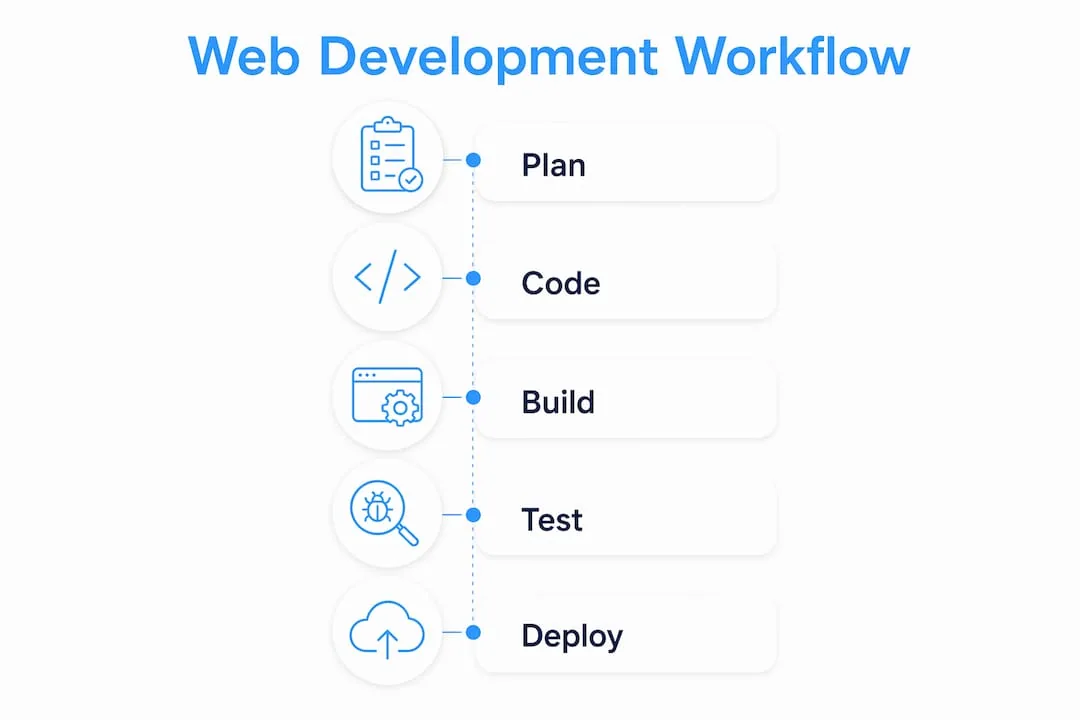
Here is something that often gets overlooked. Most conversations about the best web development tools focus on individual tools in isolation, as though choosing VS Code or picking React is the whole decision. In practice, modern web development involves at least four distinct workflow phases, and no single tool covers all of them optimally.
Those phases are:
- Editing and coding: Writing, formatting, and navigating source code with intelligent assistance.
- Building and testing: Compiling, bundling, running unit and integration tests, and managing dependencies.
- Running and debugging: Executing applications locally, inspecting runtime behaviour, and resolving errors.
- Deploying and monitoring: Pushing code to staging or production environments and observing application health.
The practical implication is that your toolchain is always a collection of specialised tools working in concert. What separates productive teams from frustrated ones is how well those tools integrate with each other. Ecosystem support, plugin availability, and CI/CD compatibility are not secondary concerns. They are primary evaluation criteria.
The concept of workflow-unifying platforms matters here. Tools like Visual Studio are designed to reduce the number of context switches a developer makes in a single day by handling editing, debugging, container builds, and cloud deployment from one interface. Understanding this framing changes how you evaluate web development software from the start.
Frontend and backend framework essentials
Frameworks are not just about convenience. They are the structural decisions that determine which adjacent tools slot in naturally, which build pipelines make sense, and how maintainable your codebase will be at scale.
Frontend frameworks and their tooling
The dominant frontend options each carry their own tooling ecosystems:
- React pairs naturally with Vite for fast local development, Jest or Vitest for testing, and tools like Storybook for component isolation.
- Angular includes its own CLI tooling for code generation, testing, and builds, making it a more opinionated but self-contained choice.
- Vue.js works well with Vite out of the box and has a comparatively gentle learning curve, making it a practical choice for teams transitioning from jQuery-era codebases.
Backend frameworks and runtimes
On the server side, the picture is equally varied. Node.js remains foundational to most JavaScript-based backend workflows, providing the runtime that powers tools like Express.js and NestJS. Django brings a batteries-included philosophy to Python backends, while Ruby on Rails prioritises convention over configuration for rapid application development.
| Framework | Type | Primary language | Typical use case |
|---|---|---|---|
| React | Frontend | JavaScript / TypeScript | SPAs, complex UIs |
| Vue.js | Frontend | JavaScript / TypeScript | Progressive web apps, dashboards |
| Angular | Frontend | TypeScript | Enterprise-scale applications |
| Express.js | Backend | JavaScript (Node.js) | REST APIs, lightweight servers |
| Django | Backend | Python | Data-heavy apps, rapid prototyping |
| Ruby on Rails | Backend | Ruby | Convention-driven web applications |
The choice of framework directly influences your IDE configuration, linting rules, and build toolchain. A React project using TypeScript and Vite will require a different VS Code extension set than a Django project. Treating these as connected decisions from the outset saves significant rework later.
IDEs, debuggers, and container tooling
If frameworks form the skeleton of your project, your IDE and container tooling form the nervous system. This is where day-to-day developer productivity is won or lost.

Visual Studio and its lightweight counterpart VS Code are the most widely used web development IDEs for good reason. VS Code in particular offers IntelliSense for intelligent code completion, integrated Git support, a terminal, a debugger, and an extension marketplace covering virtually every language and framework combination. Visual Studio goes further by integrating container build tools and direct deployment pipelines to cloud environments like Azure, effectively unifying the full development lifecycle in one interface.
Container tooling deserves equal attention. The “works on my machine” problem remains one of the most common sources of wasted developer time. Lando addresses this directly by providing a free, open-source local development environment built on Docker. Teams commit a ".lando.yml` configuration file to version control, and every developer spins up an identical local environment in minutes. This approach transforms your local dev setup from an undocumented tribal knowledge problem into a reproducible, version-controlled product.
Key capabilities to look for in your web development IDEs and container tooling include:
- Integrated debugging with breakpoints and variable inspection across frontend and backend code.
- Built-in terminal and shell access without leaving the editor.
- Git integration with visual diff tools and branch management.
- CI/CD pipeline configuration support or direct cloud deployment triggers.
- Docker or container runtime support for consistent local environments.
Pro Tip: Treat your .lando.yml or docker-compose.yml as first-class project documentation. A well-commented container configuration file reduces new developer onboarding from days to hours and eliminates a whole category of “it works locally but not in CI” bugs.
Advanced productivity tools: monorepos, components, and APIs
Once a project grows beyond a single application or a team beyond a handful of developers, a new class of essential coding tools for websites becomes relevant.
Monorepo management with Nx
When you are managing multiple related applications or packages in a single repository, build and test times balloon quickly. Nx solves this by modelling your codebase as a dependency graph, meaning it only rebuilds and retests the projects actually affected by a given code change. One documented case shows CI time reduced from 18 minutes to 4 minutes through explicit dependency management alone. The real benefit, though, is not just speed. It is accurate change impact analysis, which prevents teams from accidentally shipping broken changes to unrelated packages.
The investment required to realise these gains is real. You need to declare dependencies explicitly in your Nx configuration rather than relying on implicit file-level assumptions. Teams that skip this step get faster builds but miss the critical safety benefits.
UI component development with Storybook
Storybook is used by thousands of engineering teams to build, test, and document UI components in complete isolation from the application that will consume them. The benefit is architectural discipline. When you develop a button or a modal in isolation, you are forced to think about its API, its accessibility, and its edge cases before it is buried inside a complex page. This prevents late-stage UI contract drift and makes design system maintenance practical rather than aspirational.
Storybook’s recent releases include experiments with AI agent integration, pointing toward a future where component documentation and accessibility testing are partially automated.
API testing and collaboration with Postman
Postman is used by over 40 million developers globally for API development, testing, and team collaboration. For web projects that rely on third-party or internal APIs, having a shared Postman workspace means every developer tests against the same collection of requests, with the same environment variables and authentication configurations. This consistency matters enormously when you are debugging an integration issue at 11 PM before a release.
Postman also supports CI workflow integration, which pairs naturally with automated testing practices for API-dependent projects.
Pro Tip: In a large codebase, the productivity gain from monorepo tooling is only as good as your dependency declarations. Invest time upfront in mapping explicit relationships between packages in your Nx config. The graph pays dividends every time someone asks “what does this change actually affect?”
Emerging tools shaping future workflows
The web development software landscape is shifting in ways that will redefine what constitutes a standard toolchain within the next two to three years. Staying aware of these trends is not about chasing novelty. It is about making informed tool decisions now that do not paint you into a corner later. You can explore where these key technologies and trends are heading in more depth.
Several developments stand out:
- AI-assisted coding tools like GitHub Copilot and Cursor are moving from novelty to genuine productivity multipliers for repetitive tasks, boilerplate generation, and test writing. Their value is highest when used by developers who already understand the code they are generating.
- Serverless and cloud-native development tools are reducing the infrastructure overhead traditionally associated with deploying web applications. Platforms that integrate directly with cloud functions and edge computing reduce the gap between code and production.
- No-code and low-code platforms are not replacing professional developers. They are enabling faster prototyping and empowering non-technical stakeholders to build and iterate on interfaces without engineering bottlenecks.
- WebAssembly (Wasm) toolchains are opening the door to running high-performance, non-JavaScript code in the browser. This has significant implications for computation-heavy web applications like video editing tools, design software, and scientific visualisation.
- Browser-based development environments like FrontStudio offer VS Code-like experiences with live preview and shareable environments, removing local setup friction for prototyping and collaboration entirely.
The common thread across all of these is that the distance between idea and deployed feature is shrinking. Your toolchain choices now need to account for this acceleration.
My honest take on tool selection
I have seen teams spend weeks evaluating toolchains and then build something no one uses. I have also seen teams ship impressive, maintainable products with a deliberately minimal setup. What I have learned is that the developers who make the best tool choices are not the ones who chase the newest technology. They are the ones who ask the right questions first.
What phase of the workflow is causing the most friction for your team right now? That is the tool decision worth prioritising. Everything else is premature optimisation.
The temptation to adopt a complex monorepo setup, a new component library, and an AI coding assistant all at once is real. But each tool you add to a workflow is a dependency you need to maintain, upgrade, and train your team on. The cost of complexity is almost always underestimated.
My recommendation is to build your toolchain incrementally, anchored to real pain points. Start with a solid IDE and version control setup. Add container-based local environments once environment inconsistency becomes a problem. Introduce monorepo tooling only when managing multiple packages becomes genuinely unwieldy. Evaluate new tools against a single question: does this solve a problem we actually have, or does it solve a problem we think we might have someday?
The teams that maintain the best developer velocity are not the ones with the most tools. They are the ones with the most intentional tools.
— Anton
How Cloudfusion can support your development
Choosing the right tools is one thing. Putting them together into a workflow that ships quality software at pace is another discipline entirely. At Cloudfusion, we apply considered, modern tooling to every custom web development project we deliver, from framework selection and environment configuration through to deployment and hosting. We do not apply a one-size-fits-all stack. We evaluate your project’s scale, your team’s existing skills, and your business requirements to make deliberate tool decisions that reduce friction and support long-term maintainability. If you are building a new web application or reassessing an existing one, give us a shout. We would be glad to discuss your project and help you identify where the right tooling can make the biggest difference.
FAQ
What are development tools for websites?
Development tools for websites are software applications and platforms used across the coding, building, testing, debugging, and deployment phases of web development. They include IDEs, frameworks, container tools, testing platforms, and version control systems.
Which web development IDEs are most widely used?
VS Code and Visual Studio are the most widely used web development IDEs, offering integrated debugging, Git support, extensions, and, in Visual Studio’s case, direct cloud deployment pipelines for full lifecycle development.
How does Nx improve large-scale web project workflows?
Nx models codebases as dependency graphs and only rebuilds and retests affected projects, reducing CI times significantly. One documented case shows CI time dropping from 18 to 4 minutes through explicit dependency management.
Why is environment consistency important in web development?
Inconsistent local environments cause bugs that only appear in certain setups, slowing debugging and increasing onboarding time. Tools like Lando standardise environments using version-controlled container configurations, eliminating most environment-specific issues.
What role do API testing tools play in modern web development?
API testing tools like Postman allow teams to validate, document, and share API requests in a unified platform used by over 40 million developers, supporting consistent testing across development, staging, and CI environments.