TL;DR:
- Scalable web hosting dynamically adjusts server resources to handle website traffic, ensuring minimal downtime during growth. Cloud hosting provides the most flexible auto-scaling solutions, but proper infrastructure and application optimization are essential for performance. Planning ahead with monitoring, cost assessment, and resource buffers helps businesses maintain reliability during traffic surges.
Scalable web hosting is defined as a hosting environment that dynamically allocates server resources — CPU, RAM, and bandwidth — to match your website’s live traffic demands, maintaining uptime and performance regardless of load. This is the industry standard for any business that cannot afford downtime during growth or traffic surges. The formal term used by cloud infrastructure providers is elastic hosting or auto-scaling hosting, and understanding that distinction matters when you evaluate providers like DreamHost, UpCloud, or any local South African host. This guide to scalable web hosting covers the core types, how auto-scaling actually works, a step-by-step selection process, and the pitfalls that catch businesses off guard. Whether you are running a growing e-commerce store or a corporate web application, the right hosting foundation determines how well your digital presence holds up under pressure.
What are the main types of scalable web hosting?
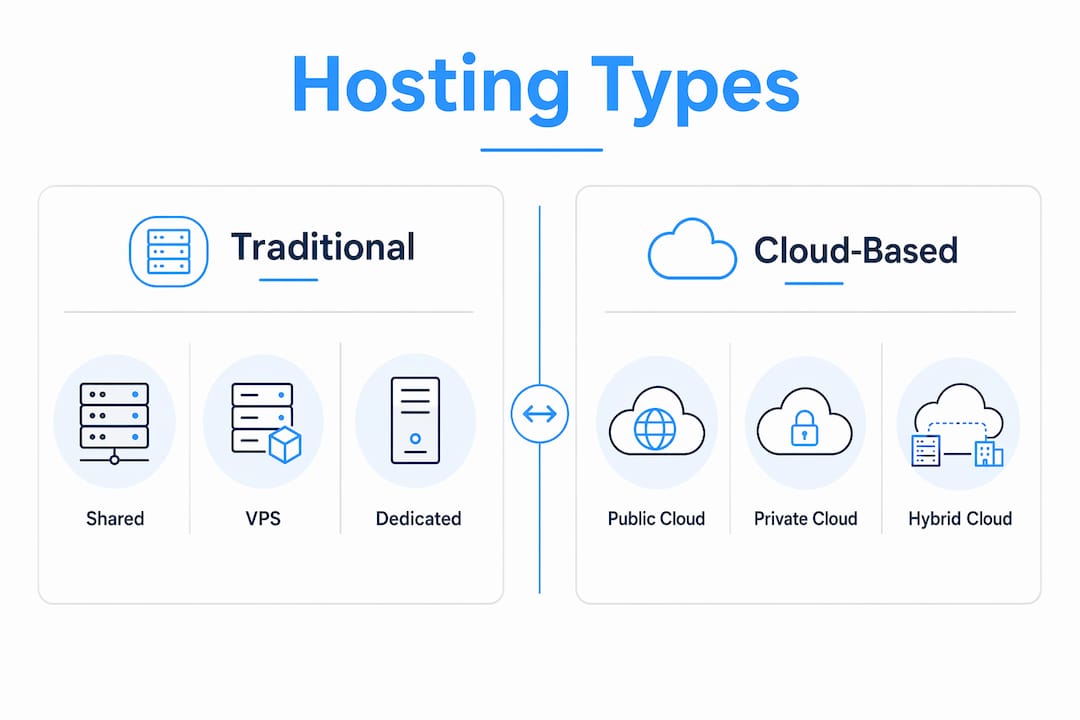
Choosing the right hosting type is the first real decision in any guide to web hosting scalability. Each type offers a different balance of cost, control, and scaling capability.
Shared hosting places multiple websites on one physical server. Resources are pooled, which means a traffic spike on one site can degrade performance for all others. Scaling options are minimal and typically require a full account migration. Shared hosting suits early-stage websites with low and predictable traffic, but it is not a viable long-term solution for growing businesses.
VPS (Virtual Private Server) hosting provides dedicated resources within a virtualised environment. VPS hosting can be scaled by adding CPU, RAM, or storage, sometimes automatically depending on the provider. This makes VPS a practical midpoint between shared and dedicated hosting, offering more control without the full cost of a physical server.
Dedicated hosting gives you an entire physical server. Scaling requires either upgrading hardware or provisioning additional servers, which is costly and time-consuming. Dedicated hosting suits high-traffic enterprises with specific compliance or performance requirements.
Cloud hosting is the most flexible option for scalable web hosting solutions. Cloud hosting connects your site to a distributed network of servers sharing a large pool of resources, enabling your site to go from handling 1,000 visitors to 100,000 visitors without downtime. This is the architecture that makes true auto-scaling possible.
| Hosting type | Scalability | Cost range (R/month) | Traffic capacity | Best for |
|---|---|---|---|---|
| Shared | Very limited | R50–R200 | Low | Startups, brochure sites |
| VPS | Moderate | R300–R1,500 | Medium | Growing SMEs |
| Dedicated | Manual | R2,000–R8,000+ | High | Large enterprises |
| Cloud | Auto-scaling | R500–R5,000+ | Very high | E-commerce, SaaS, high-growth |
The key differentiator is not just current capacity. It is the upgrade path. Providers with clear scalability plans and transparent pricing tiers give you a predictable growth trajectory. Always confirm whether scaling is manual, semi-automatic, or fully automated before signing a contract.
How does auto-scaling work and what are its limitations?
Auto-scaling is the mechanism that makes cloud hosting genuinely elastic. Understanding how it works prevents unrealistic expectations and poor infrastructure decisions.
Horizontal scaling adds more server instances to distribute load. If your site receives a sudden spike in traffic, the cloud platform spins up additional virtual machines and routes requests across them. Vertical scaling increases the power of an existing server by allocating more CPU or RAM. Most cloud platforms use a combination of both, managed by a load balancer that routes traffic across available servers without downtime.
Here is what most businesses miss: auto-scaling cannot fix poorly optimised code. If your application runs inefficient database queries or lacks caching, adding more servers simply multiplies the inefficiency. Application-level optimisations — including Redis caching, query indexing, and CDN integration — must work alongside auto-scaling for consistent performance. Scaling infrastructure is the floor, not the ceiling.
Key limitations to plan for:
- Cold start latency: Spinning up new server instances takes seconds to minutes. During a sudden, sharp traffic spike, users may experience brief slowdowns before new capacity comes online.
- Cost unpredictability: Auto-scaling that is not capped can generate unexpected bills during prolonged traffic surges.
- Misconfiguration risk: Scaling thresholds set too high delay the response. Thresholds set too low trigger unnecessary scaling and inflate costs.
- Application bottlenecks: Databases and third-party APIs often become the real bottleneck, not the web server layer.
Pro Tip: Pre-allocate roughly 50% extra capacity above your current baseline before any predicted traffic event — a product launch, a sale, or a media feature. This buffer absorbs the initial surge while auto-scaling catches up, preventing the latency gap that frustrates users at the worst possible moment.
For a deeper technical view on auto-scaling configuration, right-sizing resource requests and limits is as important as the scaling policy itself.
Step-by-step guide to choosing and implementing scalable hosting
This step-by-step web hosting guide gives you a repeatable process for selecting and deploying a hosting solution that grows with your business.

Step 1: Assess your current and projected traffic Audit your existing traffic data using Google Analytics or a server-side tool. Identify your average monthly visitors, peak concurrent users, and seasonal patterns. Project growth conservatively over 24–36 months. This baseline determines the minimum hosting tier you need today and the headroom you require tomorrow.
Step 2: Define your technical requirements Identify your application stack (PHP, Node.js, Python, etc.), database type, and any compliance requirements. Some industries in South Africa require data residency within the country, which limits your cloud provider options. Confirm that your shortlisted hosts support your stack natively.
Step 3: Calculate three-year total cost of ownership Introductory pricing is rarely the real price. Budget for hosting over three years to account for renewal price spikes, which can double or triple your initial rate. Include domain registration, SSL certificates, backup storage, and any add-on fees. A plan that costs R200 per month in year one may cost R600 per month by year three.
Step 4: Set up resource monitoring and scaling thresholds
| Metric | Recommended trigger threshold | Action |
|---|---|---|
| CPU usage | Above 70% for 5 minutes | Scale up or out |
| RAM usage | Above 80% | Add memory or instance |
| Bandwidth | Above 85% of allocation | Upgrade tier or add CDN |
| Response time | Above 2 seconds | Investigate bottleneck |
Configure alerts through tools like UptimeRobot, Datadog, or your provider’s native dashboard. Do not wait for users to report slowdowns.
Step 5: Implement the 3-2-1 backup rule The 3-2-1 backup rule is the industry standard in 2026: keep three total copies of your data, stored on two different media types, with one copy offsite. This protects against hardware failure, ransomware, and accidental deletion simultaneously.
Step 6: Verify SLA-backed uptime guarantees Generic “99.9% uptime” claims are marketing, not accountability. Uptime guarantees must be backed by specific, credit-based SLAs that compensate you when availability drops below the threshold. Use independent tools like UptimeRobot to verify actual availability, not just provider-reported figures.
Step 7: Test your scaling setup before you need it
Pro Tip: Run a load test using tools like Apache JMeter or k6 before your next major traffic event. Simulate two to three times your expected peak load and observe how your hosting environment responds. Identify bottlenecks in staging, not in production.
For businesses building applications on top of their hosting infrastructure, Cloudfusion’s guide on building scalable web applications covers the application layer considerations that complement your hosting choices.
Common challenges in scalable hosting deployments
Even well-planned hosting setups encounter problems. Knowing what to expect lets you resolve issues before they affect your users or your budget.
Renewal price spikes and hidden costs Many providers offer aggressive introductory rates that expire after 12 months. Renewal prices can be two to three times higher. Read the full pricing schedule, not just the headline rate. Watch for charges on backups, SSL renewal, migration assistance, and support tiers.
Misleading “unlimited” hosting offers “Unlimited” bandwidth or storage claims always carry acceptable use policies that cap actual usage. These limits are enforced during traffic surges, precisely when you need capacity most. Treat any “unlimited” claim with scepticism and request the specific resource limits in writing.
Uptime claims without independent verification Scheduled maintenance windows often cause downtime that providers exclude from their uptime calculations. Third-party monitoring tools like UptimeRobot provide an objective record of actual availability. This data is also useful when claiming SLA credits.
Key principle: A provider’s advertised uptime percentage is only as credible as the independent data backing it. Always verify with your own monitoring before committing to a long-term contract.
Scaling delays during rapid traffic surges Auto-scaling is not instantaneous. If your site receives a sharp, sudden spike — from a viral post or a flash sale — there is a window of seconds to minutes where capacity lags behind demand. The pre-allocation buffer strategy (50% above baseline) addresses this directly.
Load balancing misconfigurations Incorrect load balancer settings can route disproportionate traffic to a single server, negating the benefit of horizontal scaling. Common issues include sticky session misconfigurations, health check failures, and incorrect timeout settings. Review your load balancer logs regularly and test failover scenarios in a staging environment. Cloudfusion’s resource on hosting configuration for fast sites covers practical configuration steps for avoiding these issues.
Key takeaways
Scalable web hosting requires a combination of the right hosting type, properly configured auto-scaling, application-level optimisation, and verified SLA-backed reliability to deliver consistent performance during growth.
| Point | Details |
|---|---|
| Choose cloud for true auto-scaling | Cloud hosting is the only type that supports fully automated, dynamic resource allocation without downtime. |
| Budget over three years, not one | Renewal price spikes can double or triple costs; calculate total cost of ownership before committing. |
| Pair auto-scaling with code optimisation | Auto-scaling alone cannot compensate for inefficient queries or missing caching layers. |
| Verify uptime independently | Use tools like UptimeRobot to confirm actual availability rather than relying on provider claims. |
| Pre-allocate a 50% resource buffer | Allocating extra capacity ahead of predicted traffic surges prevents latency during the scaling window. |
What I have learned from scalable hosting projects in South Africa
After working on hosting deployments across a range of South African businesses, from retail e-commerce to financial services platforms, a few patterns stand out consistently.
The businesses that handle growth well are not necessarily the ones with the biggest budgets. They are the ones that treat hosting as a strategic decision rather than a commodity purchase. They ask the right questions upfront: What happens when traffic doubles? Who do I call at 2am on a Saturday? What does the SLA actually compensate me for?
The single most common mistake I see is choosing a provider based on introductory pricing without modelling the three-year cost. A R150-per-month plan that renews at R450 per month is not a bargain. It is a budget trap. South African businesses operating in rands face additional pressure from currency fluctuations when using USD-priced international providers, which makes local, rand-denominated hosting contracts worth serious consideration.
I am also direct about auto-scaling being misunderstood. Most business owners hear “auto-scaling” and assume their hosting will handle anything. It will not, if the application underneath it is not optimised. The hosting environment is the foundation. The application code, database queries, and caching strategy are the structure built on top. Both must be sound.
My practical advice: start with a cloud VPS or entry-level cloud hosting plan, set up monitoring from day one, and plan your upgrade path before you need it. Reactive scaling is always more expensive and more stressful than proactive planning. Work with a technology partner who understands both the infrastructure and your business growth objectives.
— Anton
How Cloudfusion supports your hosting and digital growth
Cloudfusion offers fast and secure web hosting packages designed for South African businesses that need reliable, scalable infrastructure without the complexity of managing it alone. From entry-level cloud hosting to fully managed solutions, Cloudfusion’s packages are priced in rands and backed by local support. Beyond hosting, Cloudfusion provides custom web development services that ensure your application is built to perform efficiently on scalable infrastructure. If you are ready to move your business onto a hosting platform that grows with you, give us a shout and let’s chat about your project requirements.
FAQ
What is scalable web hosting?
Scalable web hosting is a hosting environment that automatically adjusts server resources such as CPU, RAM, and bandwidth to match live traffic demands. It maintains uptime and performance during growth or sudden traffic surges.
Which hosting type is most scalable?
Cloud hosting is the most scalable option because it draws resources from a distributed server network and supports automatic horizontal and vertical scaling without downtime.
How do I verify a host’s uptime claims?
Use independent monitoring tools like UptimeRobot to track actual availability. Provider-reported uptime figures often exclude scheduled maintenance windows, which can misrepresent real performance.
What is the 3-2-1 backup rule in web hosting?
The 3-2-1 rule means keeping three total copies of your data, on two different media types, with one copy stored offsite. This is the industry-standard approach to resilient data management in 2026.
How much extra capacity should I pre-allocate for traffic spikes?
Pre-allocate approximately 50% above your current resource baseline before any predicted high-traffic event. This buffer absorbs the initial surge while auto-scaling provisions additional capacity.
Recommended