TL;DR:
- Small business websites are essential for visibility and customer engagement.
- Choose the right platform based on your budget, needs, and technical skills.
- Launch quickly, test thoroughly, and refine content based on real user feedback.
Getting your small business online is no longer optional. Without a website, you are invisible to the majority of potential customers who search for products and services before making a purchase decision. Yet many small business owners and startup founders delay launching because the process feels technically overwhelming or financially out of reach. The good news is that building a professional, functional website is more accessible than ever, regardless of your technical background. This guide walks you through every critical stage, from defining your goals to pressing publish, so you can establish a credible online presence with confidence.
Table of Contents
- Clarifying your website goals and requirements
- Choosing the right platform: Builder, template, or custom?
- Building your site: Step-by-step process
- Final checks and launching your website
- What most guides miss about small business websites
- How Cloudfusion helps your small business thrive online
- Frequently asked questions
Key Takeaways
| Point | Details |
|---|---|
| Clarify your website goals | Knowing your core business needs ensures your website supports real growth. |
| Choose the best platform | Builder, template, or custom site—pick the one that fits your resources and goals. |
| Follow proven steps | A structured process minimizes errors and launches your site faster. |
| Prioritize quick launch | Going live and learning from feedback is better than aiming for perfection. |
| Consider professional help | For advanced needs, custom development and branding services can offer big benefits. |
Clarifying your website goals and requirements
With a clear promise of practical solutions, let’s start by defining exactly what your small business website should accomplish. Before you register a domain or choose a platform, you need a precise understanding of why the site exists and what it must do for your business.
Start by identifying your primary goal. Is the site meant to generate leads, sell products directly, showcase a portfolio, or provide information to existing clients? Each objective demands a different structure, feature set, and design approach. A service-based business needs a strong contact form and clear calls to action. An e-commerce operation requires a product catalogue, payment gateway, and inventory management. A creative professional needs a visually compelling portfolio.
Next, list the essential features your site must have from day one:
- Contact forms and enquiry pages
- A gallery or portfolio section
- Online booking or appointment scheduling
- A product catalogue or shop
- A blog or resource section
- Location map and business hours
You also need to assess your technical comfort level honestly. Most small businesses can use DIY website builders for fast, low-cost setups, but if your requirements involve custom integrations, advanced automation, or a highly specific user experience, a custom-built solution will serve you better in the long run.
Finally, take inventory of your existing assets. Do you have a logo, brand colours, professional photography, and written copy ready? Gaps in these areas will slow your build significantly. Preparing your content before you start designing saves time and prevents a half-finished site from sitting in limbo.
| Asset | Ready? | Action needed |
|---|---|---|
| Logo and brand identity | Yes / No | Commission a designer |
| Written copy for all pages | Yes / No | Draft or hire a copywriter |
| Product or service images | Yes / No | Arrange a photo shoot |
| Contact details and hours | Yes / No | Compile and confirm |
Pro Tip: Write out a one-paragraph description of your ideal customer before you brief a designer or start building. Every design and content decision should serve that specific person.
If you are unsure whether to use a ready-made template or invest in a bespoke build, read our guide on choosing templates vs custom design to clarify which path aligns with your business stage and budget.
Choosing the right platform: Builder, template, or custom?
Once you know what your website should accomplish, you can choose the best technology and approach for your budget and needs. This is one of the most consequential decisions you will make, because the platform you choose shapes your site’s flexibility, maintenance burden, and long-term scalability.
There are three primary routes:
- DIY website builders such as Wix, Squarespace, or Shopify offer drag-and-drop interfaces, bundled hosting, and pre-built templates. They are ideal for businesses that need to launch quickly without technical expertise.
- Template-based builds on WordPress give you more control and customisation than pure builders, while still reducing development time. You install a theme, configure plugins, and populate content.
- Custom web development means a developer or agency builds your site from the ground up, tailored precisely to your specifications. This is the highest-cost option but delivers the most flexibility and uniqueness.
DIY builders offer cost-effective, rapid deployment for small businesses, while custom development is best for complex needs such as bespoke integrations, proprietary workflows, or highly specific brand requirements.
| Option | Typical cost | Launch time | Ease of use | Scalability |
|---|---|---|---|---|
| DIY builder | R180 to R900/month | Hours to days | Very easy | Moderate |
| WordPress template | R500 to R3,000 once-off | 1 to 3 weeks | Moderate | High |
| Custom development | R30,000 to R200,000+ | 6 to 14 weeks | Requires support | Very high |
The right choice depends on three key decision points: your available budget, how much time you can invest in setup and maintenance, and the degree of customisation your business model requires.
Pro Tip: Do not over-engineer your first website. Launch with the simplest platform that meets your core requirements. You can always migrate to a more robust solution as your business grows.
For a detailed breakdown of how these options compare in real-world scenarios, our article on custom website vs template covers the trade-offs clearly. If you are still weighing your options, this guide on the right web design approach offers additional strategic context.
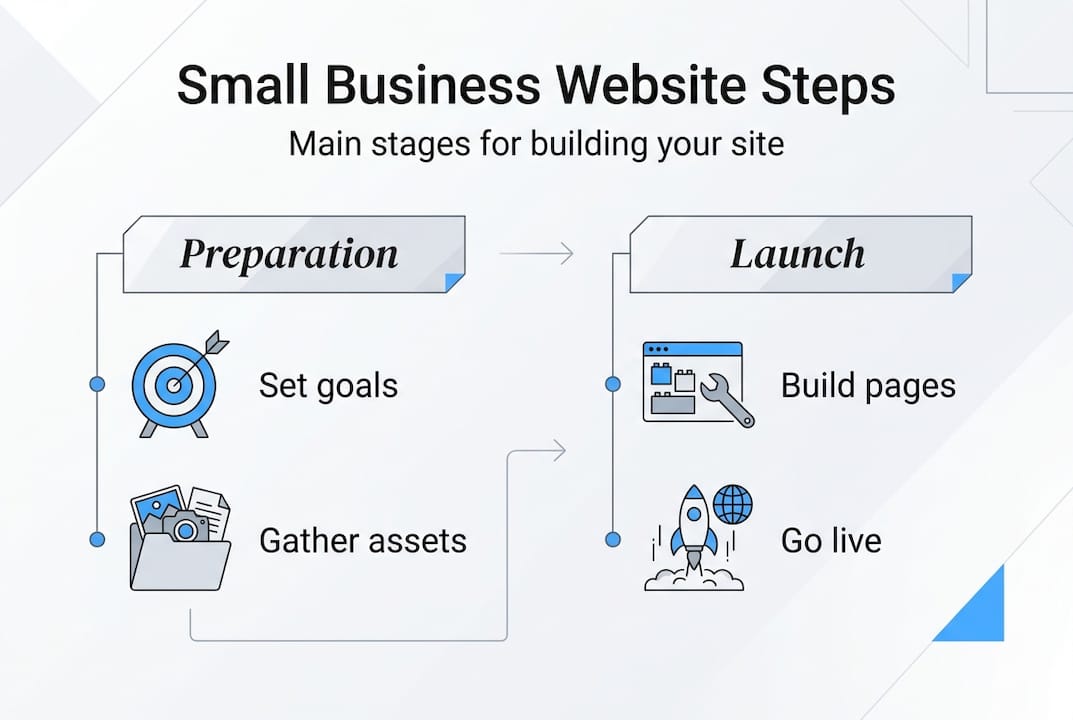
Building your site: Step-by-step process
Having selected your platform, it’s time to get hands-on with building or briefing your designer. Follow this sequence to avoid the most common pitfalls.
- Register your domain name. Choose a name that reflects your business, is easy to spell, and ends in a relevant extension (.co.za for South African businesses, .com for broader reach). Register it through a reputable registrar and ensure you own it directly, not through a third party.
- Choose your hosting or builder package. If you are using a builder like Wix or Shopify, hosting is included. If you are on WordPress, select a managed hosting provider with strong uptime guarantees and local server options for faster load times.
- Select your template or brief your designer. For DIY builds, choose a template designed for your industry. For custom projects, prepare a detailed brief that covers your goals, target audience, brand guidelines, and feature requirements.
- Add your business information and content. Populate every page with accurate, well-written copy. Include your value proposition, service descriptions, pricing (where appropriate), team information, and a compelling about page.
- Set up core features. Configure your contact form, integrate Google Maps, add your product catalogue, and set up any booking or payment systems. Test each feature individually before moving on.
- Preview, test, and refine. Review the site on desktop, tablet, and mobile before publishing. Check that all links work, images load correctly, and forms submit successfully.
“The best website is the one that is live and serving customers, not the one that is perfect and still in draft.”
DIY sites can be launched in hours or days with modern builders for $10 to $50 per month, making speed to market a genuine competitive advantage for small businesses.
Pro Tip: Prioritise mobile-friendly website features from the start. More than half of all web traffic globally comes from mobile devices, and Google ranks mobile-optimised sites higher in search results.

Final checks and launching your website
Your site structure is set, but a successful launch comes down to eliminating last-minute issues and optimising for success. Rushing this stage is one of the most common mistakes small business owners make.
Work through this pre-launch checklist before you go live:
- Mobile responsiveness: View every page on at least two different mobile devices and correct any layout issues.
- Contact form testing: Submit a test enquiry and confirm it arrives in your inbox. A broken contact form means lost leads.
- Page load speed: Use a free tool like Google PageSpeed Insights to identify images or scripts slowing your site down. Compress large images before uploading.
- Basic SEO setup: Add a unique title tag and meta description to every page. Install an SEO plugin if you are on WordPress. Submit your sitemap to Google Search Console.
- Broken links: Click through every navigation link and button to confirm they resolve correctly.
- Legal pages: Ensure you have a privacy policy and terms of use, particularly if you collect customer data or process payments.
Easy edits and ongoing improvements are a primary advantage of using website builders, meaning your launch does not need to be flawless. It needs to be functional.
Once live, monitor your site’s performance using Google Analytics. Track which pages attract the most traffic, where visitors drop off, and which calls to action convert. This data guides your next round of improvements far more effectively than assumptions made before launch.
Pro Tip: If your business scales and your requirements grow, explore enterprise website features to understand when it makes sense to invest in a more robust, scalable architecture.
What most guides miss about small business websites
With all the logistics addressed, it’s worth considering a perspective rarely emphasised in typical website how-tos. Most guides focus on technical steps and platform comparisons, but the single biggest obstacle we see small business owners face is not complexity. It is delay.
Businesses spend weeks, sometimes months, perfecting copy, debating colour palettes, and waiting for the ideal logo before launching. Meanwhile, competitors with imperfect but live websites are capturing the customers you are waiting to serve. The uncomfortable truth is that a functional website launched today is worth more than a flawless one launched in six months.
Customer feedback after launch is genuinely irreplaceable. You will learn more about what your audience needs from two weeks of live traffic than from two months of internal planning. Your website should be treated as a living asset, not a finished product. The value of custom websites becomes most apparent when businesses iterate based on real user behaviour, not assumptions. Launch, learn, and evolve.
How Cloudfusion helps your small business thrive online
If you want expert support or a custom-built web solution, here’s how Cloudfusion can help. At Cloudfusion, we specialise in designing and developing websites tailored to the specific needs of small businesses and startups. Whether you need a polished custom web development solution or strategic branding services to strengthen your digital identity, our team delivers end-to-end support from initial planning through to hosting and ongoing maintenance. We understand that every business is at a different stage, which is why our approach is always tailored, never generic. Request a web design quotation today and take the first step toward a website that works as hard as you do.
Frequently asked questions
What’s the cheapest way to make a small business website?
DIY website builders like Wix or Shopify allow you to build a professional site for as little as $10 to $50 per month, making them the most cost-effective entry point for most small businesses.
How long does it take to launch a small business website?
DIY websites can launch in hours or days using modern builders, while custom-built solutions typically require six to fourteen weeks depending on complexity and scope.
Is a custom website worth the higher cost?
A custom website is the right investment when you need advanced features, third-party integrations, or a unique brand experience. For straightforward needs, custom builds cost between $3,000 and $20,000, so weigh that against your specific requirements before committing.
Can I update my website after it’s live?
Yes. Easy edits and ongoing improvements are a core advantage of modern website builders, allowing you to update content, add pages, and refine your site at any time without technical expertise.
What are must-have features for a small business website?
Every small business website should include a working contact form, clear service or product listings, mobile responsiveness, and fast page load speed. These four elements directly affect both user experience and search engine visibility.
Recommended