

How to secure web applications: a 2026 guide
Learn how to secure web applications with proven strategies and frameworks to protect your systems from breaches and disruptions.
Start reading
TL;DR:
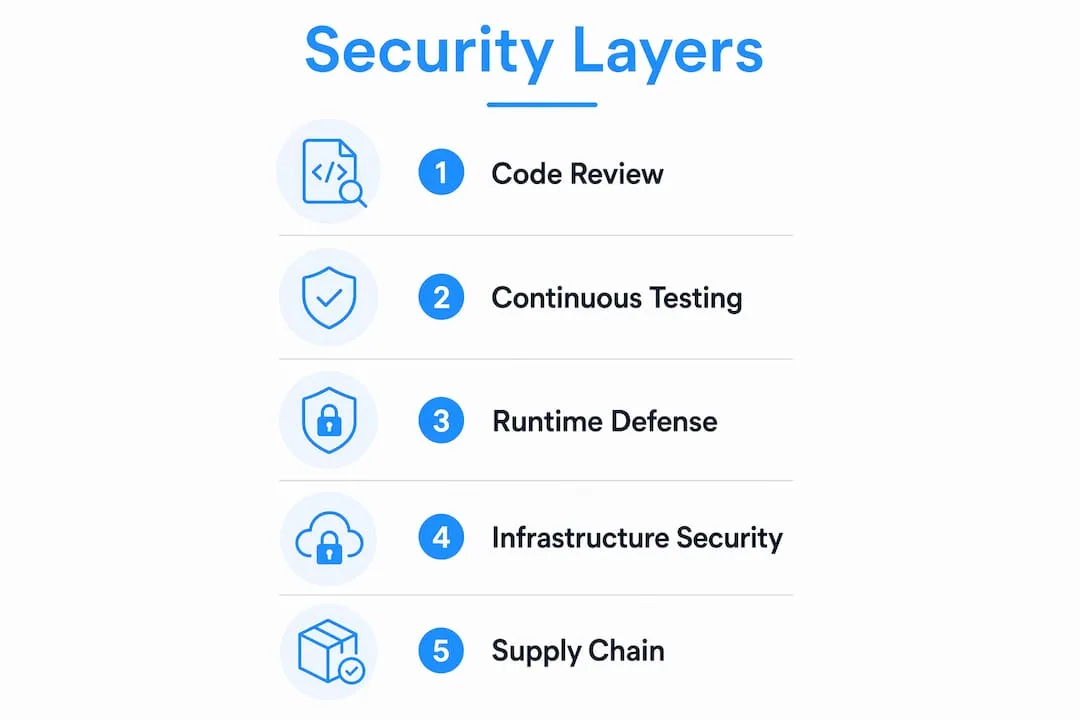
- Securing web applications requires layered controls across code, infrastructure, and runtime environments to prevent vulnerabilities and breaches.
- Implementing continuous testing, strict input validation, and runtime protections like WAFs and Zero Trust architecture is essential for effective security.
Web application security is defined as the practice of protecting web-based systems from unauthorised access, data breaches, code injection, and service disruption through layered defensive controls spanning code, configuration, and runtime environments. Knowing how to secure web applications is no longer optional for developers and security professionals. The SANS SWAT Checklist provides a proven baseline covering error handling, data protection, session management, input/output handling, and access control. The NIST Secure Software Development Framework (SSDF) extends this by embedding security across every phase of the software development lifecycle. Together, these frameworks confirm that defence-in-depth, combining multiple controls across application code, server configuration, and client-side layers, is the most effective approach to protecting web applications.
What are the foundational best practices for securing web applications?
The single most consequential mistake developers make is trusting data that originates from the browser. Most exploits succeed precisely because applications accept browser-supplied data without verification, then pass it directly into SQL queries, OS commands, or HTML output. The fix is not a single sanitisation step at the point of entry. Inputs must be validated and encoded appropriately for every use context, whether that is a database query, a shell command, or a rendered HTML page.
Here are the baseline controls every web application must have in place:
- Input validation and sanitisation: Apply allow-list schemas on the server side. Reject anything that does not conform. Never rely on client-side validation alone, since it is trivially bypassed.
- Contextual output encoding: XSS attacks persist when user data is rendered without context-appropriate encoding. Encode for HTML, JavaScript, CSS, and URL contexts separately.
- Strong authentication: Use Argon2id, bcrypt, or scrypt for password hashing. Weak authentication remains one of the leading causes of web application breaches. Pair hashing with multi-factor authentication (MFA) to reduce account takeover risk significantly.
- Secure session management: Generate cryptographically random session tokens. Rotate them after login. Set expiration, HttpOnly, Secure, and SameSite flags on session cookies.
- Strict authorisation at every request: Do not rely on UI-level controls to restrict access. Every backend request must verify that the authenticated user has permission to perform the requested action.
- HTTPS and HSTS: Configure HTTPS and enable HSTS to protect credentials, cookies, and all data in transit. HSTS prevents downgrade attacks by instructing browsers to refuse plain HTTP connections. This makes TLS and HSTS application security components, not merely infrastructure concerns. For a deeper look at how HTTPS and HSTS work together, the HSTS and HTTPS guide from Trustico is worth reading.
- Security response headers: Deploy Content-Security-Policy (CSP), X-Frame-Options, X-Content-Type-Options, and Referrer-Policy headers. These headers reduce the attack surface for XSS, clickjacking, and MIME-type sniffing attacks.
The OWASP Top 10 maps directly to these controls. Injection, broken authentication, XSS, and security misconfiguration all have direct mitigations in the list above. Treat the OWASP Top 10 as your minimum compliance target, not your ceiling.
Pro Tip: Deploy your CSP in report-only mode first. This lets you observe what would be blocked without breaking your application, so you can refine the policy before enforcing it.
How to integrate continuous security testing in the development lifecycle
Security testing embedded in the development pipeline catches vulnerabilities before they reach production. Treating it as a pre-release gate is too late. The NIST SSDF is explicit: integrating secure development practices throughout the software lifecycle reduces vulnerabilities in released code and prevents future recurrence.
The four testing methods every team should integrate are:
- Static Application Security Testing (SAST): Analyses source code without executing it. Tools like Checkmarx, Semgrep, and SonarQube scan for injection flaws, insecure cryptography, and hardcoded credentials during the build phase. SAST runs fast and gives developers immediate feedback.
- Dynamic Application Security Testing (DAST): Tests the running application by simulating attacks. Tools like OWASP ZAP and Burp Suite send malformed inputs, probe authentication flows, and identify runtime misconfigurations that SAST cannot detect from source code alone.
- Interactive Application Security Testing (IAST) and API security testing: IAST instruments the application at runtime to observe behaviour from the inside. API-specific scanners validate authentication, rate limiting, and schema enforcement on REST and GraphQL endpoints, which are increasingly the primary attack surface in modern applications.
- Dependency and container image scanning: Automated vulnerability scanners integrated into CI/CD pipelines flag outdated libraries and vulnerable base images before deployment. Tools like Snyk, Trivy, and Dependabot automate this at every commit.
The table below shows how each testing method fits into the development pipeline:
| Testing method | Stage | Primary focus |
|---|---|---|
| SAST | Build / commit | Source code flaws, hardcoded secrets |
| DAST | Staging / pre-release | Runtime vulnerabilities, misconfigurations |
| IAST | Test / QA | Behavioural anomalies, logic flaws |
| Dependency scanning | Every commit | Third-party library CVEs, outdated packages |

Automating these checks in your CI/CD pipeline, whether that is GitHub Actions, GitLab CI, or Azure DevOps, means security feedback arrives in minutes rather than days. The earlier a flaw is found, the cheaper it is to fix.
What runtime and infrastructure protections enhance web application security?
Development controls alone cannot protect a live application. Runtime and infrastructure protections fill the gaps that code-level measures leave open, particularly in API-driven architectures where attack surfaces change frequently. Runtime enforcement and real-time traffic inspection are necessary complements to development controls, not optional additions.
The key runtime protections to deploy are:
- Web Application Firewall (WAF): A WAF inspects Layer 7 traffic and blocks injection attempts, XSS payloads, and protocol abuse before they reach your application. Solutions like AWS WAF, Cloudflare WAF, and Azure Front Door WAF integrate directly with cloud hosting environments.
- Bot detection and mitigation: Credential stuffing, scraping, and automated vulnerability scanning are bot-driven. Deploy behavioural bot detection to distinguish legitimate users from automated abuse.
- DDoS protection: Availability is a security property. Services like Cloudflare, AWS Shield, and Akamai absorb volumetric attacks at the network edge, keeping your application accessible under load.
- Zero Trust architecture: Zero Trust verifies every request and enforces least privilege, eliminating the assumption that internal traffic is safe. This is particularly important for microservices and API-to-API communication within your own infrastructure.
- Secure API gateways: Enforce authentication (OAuth 2.0, API keys), rate limiting, and schema validation at the gateway layer. This prevents abuse even when individual services have gaps.
The comparison below shows the difference between perimeter-based and Zero Trust security models:
| Dimension | Perimeter-based | Zero Trust |
|---|---|---|
| Trust assumption | Internal traffic is trusted | No traffic is trusted by default |
| Verification | At the network boundary | Every request, every time |
| Lateral movement risk | High | Significantly reduced |
| API protection | Limited | Enforced at gateway and service level |
Pro Tip: Enable TLS 1.3 and disable TLS 1.0 and 1.1 on all your servers. TLS 1.3 removes legacy cipher suites that are vulnerable to downgrade attacks and reduces handshake latency at the same time.
How to manage third-party dependencies and supply chain risks
Supply chain attacks have become one of the most exploited vectors in web application security. Many compromises arise from outdated or vulnerable third-party components, not from flaws in custom code. A single compromised npm package or Docker base image can expose your entire application.
Practical steps to manage this risk include:
- Maintain a Software Bill of Materials (SBOM): An SBOM gives you a complete inventory of every library, framework, and container image your application depends on. Tools like Syft and CycloneDX generate SBOMs automatically. Without this inventory, you cannot know what you are protecting.
- Validate component integrity and provenance: Use package lock files (package-lock.json, Pipfile.lock) and verify checksums. For container images, use signed images and verify signatures before deployment.
- Automate patch management: Integrate Dependabot, Renovate, or Snyk into your repository to receive automated pull requests when dependencies have known CVEs. Unpatched libraries are the low-hanging fruit for attackers.
- Apply the SANS SWAT Checklist to third-party components: The SWAT Checklist baseline applies equally to how you consume external code. Validate that third-party components meet your error handling, data protection, and access control standards before adoption.
- Limit dependency scope: Only include libraries you actively use. Unused dependencies expand your attack surface without adding value. Audit your dependency tree quarterly and remove what is no longer needed.
For broader guidance on protecting sensitive data flowing through your application stack, the Cloudfusion article on securing customer data covers complementary practices for IT and development teams.
Key takeaways
Securing web applications requires layered controls across code, infrastructure, and runtime, supported by continuous testing and disciplined dependency management.
| Point | Details |
|---|---|
| Input validation is context-specific | Sanitise data separately for SQL, HTML, OS, and API contexts, not just at the point of entry. |
| Continuous testing catches flaws early | Integrate SAST, DAST, and dependency scanning into CI/CD pipelines to find vulnerabilities before production. |
| Runtime protections are non-negotiable | WAFs, Zero Trust architecture, and secure API gateways protect live applications that code controls cannot fully cover. |
| Supply chain risk demands active management | Maintain an SBOM, automate patching, and validate third-party component integrity at every build. |
| HTTPS and HSTS are application controls | Enabling HSTS prevents downgrade attacks and protects session data, making transport security a code-level responsibility. |
Security is a discipline, not a deployment step
Here is my honest view after working on web application projects across a range of South African industries: most teams treat security as something you bolt on before go-live. They run a penetration test, fix the critical findings, and consider the job done. That approach fails, and it fails predictably.
The threat environment does not pause between your releases. New CVEs are published daily. Your dependencies age the moment you deploy them. A Zero Trust model or a WAF rule set that was adequate six months ago may have gaps today. The teams I have seen handle this well treat security the same way they treat performance: as a continuous metric with automated monitoring, not a milestone.
South African businesses face an additional layer of complexity. The Protection of Personal Information Act (POPIA) creates legal accountability for data breaches, and local infrastructure constraints mean that some cloud-native security tooling requires careful configuration to perform reliably on South African hosting environments. Getting the cybersecurity basics right for SA businesses is the foundation before layering on advanced controls.
My recommendation is to start with the SANS SWAT Checklist and NIST SSDF as your structural framework, automate your testing pipeline, and then build runtime protections incrementally. Security culture matters as much as tooling. When developers understand why input validation prevents SQL injection, they write safer code instinctively. That is the outcome worth working towards.
— Anton
How Cloudfusion builds security into every web project
At Cloudfusion, security by design is part of how we build, not an afterthought. Our custom web development process incorporates input validation, secure authentication, HTTPS configuration, and security header deployment from the first sprint. We also offer secure web hosting packages optimised for South African businesses, with configurations that support HSTS, TLS 1.3, and WAF integration out of the box. Beyond launch, our team provides ongoing support and security patch management to keep your application protected as the threat environment evolves. If you want to build or harden a web application with a team that understands both the technical and local compliance requirements, give us a shout and let’s chat about your project.
FAQ
What is the most common web application vulnerability?
Injection flaws, including SQL injection and XSS, consistently top the OWASP Top 10 and succeed primarily because applications trust unvalidated browser input. Server-side validation and contextual output encoding are the direct mitigations.
How does HTTPS protect a web application?
HTTPS encrypts data in transit between the client and server, preventing attackers from reading credentials, session tokens, and sensitive requests. Enabling HSTS alongside HTTPS prevents downgrade attacks by forcing browsers to refuse plain HTTP connections.
What is the difference between SAST and DAST?
SAST analyses source code statically during the build phase to find flaws like hardcoded secrets and injection vulnerabilities. DAST tests the running application by simulating real attacks, catching runtime misconfigurations that SAST cannot detect from code alone.
What is a Software Bill of Materials (SBOM) and why does it matter?
An SBOM is a complete inventory of every library, framework, and container image your application depends on. It enables rapid identification of vulnerable components when new CVEs are published, making patch management faster and more reliable.
How does Zero Trust architecture improve web application security?
Zero Trust verifies every request and enforces least privilege access, eliminating the assumption that internal network traffic is safe. This significantly reduces the risk of lateral movement if one service or API is compromised.