Testing with just 3 to 5 users uncovers 80% of usability problems, yet many developers still believe extensive testing requires dozens of participants and massive budgets. This misconception leaves countless web projects vulnerable to poor user experiences that damage client satisfaction and conversion rates. User experience in web development isn’t about subjective aesthetics or guesswork. It’s a structured, evidence-backed discipline that transforms how users interact with your digital products. In 2026, clients expect seamless experiences that drive measurable business results. This guide walks you through practical methodologies, workflows, and evaluation frameworks that empower developers and project managers to deliver exceptional UX outcomes efficiently.
Table of Contents
- Understanding Core Ux Methodologies For Web Development
- Integrating Ui/Ux Workflows And Best Practices
- Designing For Edge Cases And Benchmarking To Improve Trust
- Leveraging Ux Patterns And Evaluation Models For Developers And Managers
- Enhance Your Projects With Expert Web Development Solutions
Key takeaways
| Point | Details |
|---|---|
| Structured 8-step process | Following define, research, wireframe, prototype, test, and iterate phases ensures comprehensive UX coverage across projects |
| Edge case design matters | Designing for empty states, failures, and extreme inputs early builds user trust and reduces support tickets |
| Benchmarking drives improvement | Comparing UX metrics across sectors reveals realistic goals and guides targeted enhancements for specific industries |
| Small user tests work | Testing with 3 to 5 users identifies most usability issues cost-effectively during development |
| Continuous iteration pays off | Post-launch optimization based on real user feedback delivers sustained improvements in satisfaction and conversions |
Understanding core ux methodologies for web development
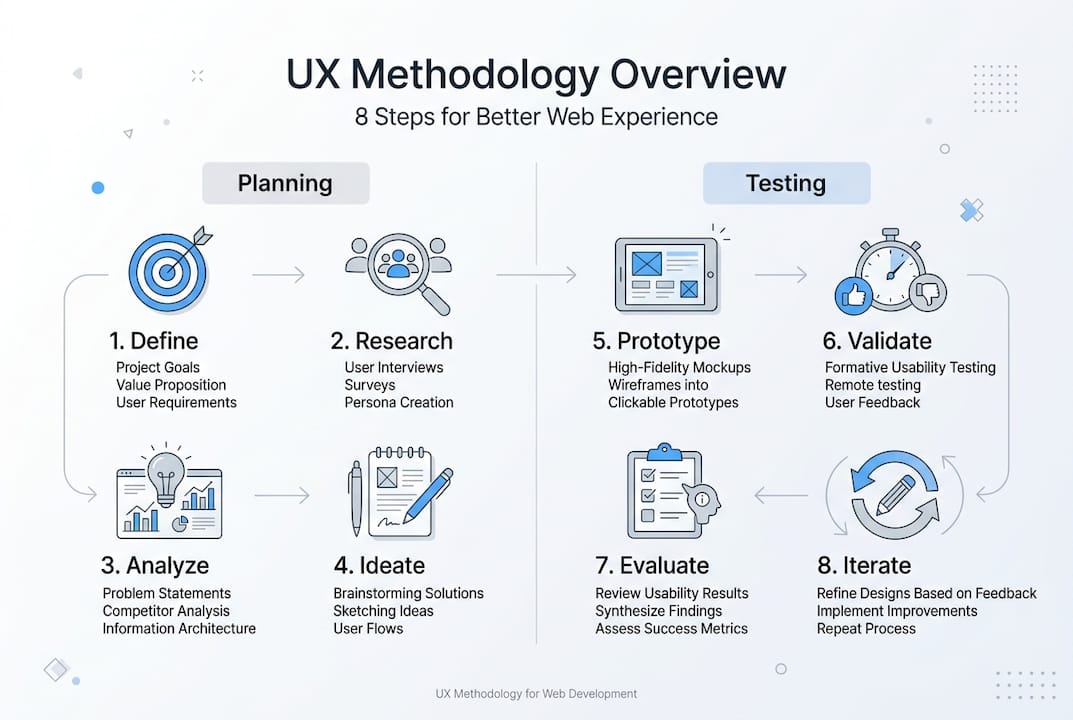
The 8-step UX methodology provides a proven framework that scales across project sizes and industries. This structured approach eliminates guesswork and ensures you address user needs systematically throughout development.
The process begins with defining clear objectives and empathizing with your target users. You must understand who will use your product, what problems they face, and what success looks like from their perspective. This foundation prevents wasted effort on features users don’t need or want.

Next comes thorough research and strategic planning. Gather quantitative data through analytics and qualitative insights through interviews or surveys. This evidence reveals user behaviors, pain points, and expectations that should drive your design decisions. Planning translates research into actionable specifications and priorities.
Wireframing and prototyping visualize your design before investing in full development. Wireframes establish layout and information hierarchy without visual distractions. Prototypes add interactivity so you can test user flows and gather feedback early when changes cost less.
Testing with small user groups delivers maximum value efficiently. You don’t need dozens of participants. Studies consistently show that 3 to 5 users reveal most major usability problems. This enables rapid iteration cycles where you test, learn, refine, and test again.
The final phase involves iterating post-launch based on real usage data. Monitor how users actually interact with your product, identify friction points, and continuously improve. This ongoing refinement keeps your UX competitive as user expectations and technologies evolve.
“User experience is not about perfection on launch day. It’s about building systems that learn and improve from every user interaction.”
Applying essential principles to enhance user experience within this methodology ensures consistency and quality. The structured approach gives you confidence that you’re covering critical aspects while remaining flexible enough to adapt to project-specific constraints.
Integrating ui/ux workflows and best practices
The comprehensive UI/UX workflow extends beyond individual methods to coordinate entire teams effectively. This end-to-end process ensures nothing falls through the cracks between research, design, development, and optimization.
Business and user research form the critical foundation. Understand stakeholder goals, technical constraints, and budget realities alongside user needs. This dual perspective prevents designs that delight users but fail business objectives, or vice versa. Document findings clearly so everyone shares the same understanding.
Information architecture establishes how content and functionality organize logically. Create sitemaps showing page relationships and user flows mapping how people move through tasks. This structural work prevents navigation confusion and ensures users find what they need quickly. Poor architecture frustrates users even when individual pages look beautiful.
Develop wireframes first, then add interactivity through prototypes before investing in detailed UI design. This sequence lets you validate structure and flow cheaply before committing to visual polish. Tools like Figma or Adobe XD enable rapid wireframe creation and collaborative feedback. Interactive prototypes simulate the real experience closely enough to catch major usability issues.
Test thoroughly at multiple workflow stages, not just at the end. Validate information architecture with card sorting exercises. Test wireframes for comprehension and navigation logic. Evaluate prototypes for task completion and user satisfaction. Each testing phase catches different issue types and prevents expensive late-stage redesigns.
Ensure smooth handoff to development with comprehensive documentation. Developers need specifications covering interactions, responsive behaviors, accessibility requirements, and edge cases. Style guides maintain visual consistency. Component libraries speed development and reduce inconsistencies. Clear documentation prevents the “lost in translation” problem where designs don’t match implementation.
Optimize post-launch using analytics, heatmaps, and user feedback. Monitor key metrics like task completion rates, time on task, and error frequencies. A/B test variations to validate improvements empirically. This data-driven optimization delivers measurable gains in conversion and satisfaction.
Pro Tip: Schedule weekly UX review sessions during development where designers and developers walk through implemented features together. This catches discrepancies early and builds shared understanding of UX goals.
Understanding ui ux distinctions helps teams collaborate effectively. Learning wireframes for modern UI design techniques accelerates your workflow and improves communication with stakeholders.
Designing for edge cases and benchmarking to improve trust
Designing edge cases early prevents the frustrating experiences that erode user trust and generate support tickets. Edge cases aren’t rare anomalies to ignore. They’re predictable scenarios that happen regularly in production environments.
Empty states occur when users first access features with no data yet. Design helpful empty states that explain what will appear here and guide users toward their first action. Generic “no data” messages waste opportunities to educate and engage users.
Failure states happen when operations don’t complete successfully due to network issues, validation errors, or system problems. Provide clear error messages explaining what went wrong and how to fix it. Avoid technical jargon that confuses non-technical users. Always offer a path forward rather than dead ends.
Partial data states arise when some information loads but other parts fail or remain incomplete. Design interfaces that degrade gracefully, showing available data while indicating what’s missing. This maintains usability even when backend systems experience problems.
Consider special characters, extreme inputs, and accessibility requirements during design, not as afterthoughts. Test with usernames containing apostrophes, addresses with unusual formats, and names from diverse cultures. Verify keyboard navigation works completely. Check screen reader compatibility thoroughly.
Use real user data for testing, not idealized assumptions. Real data includes typos, inconsistent formatting, missing optional fields, and unexpected combinations. Testing only with perfect sample data misses the messiness of production environments.
Benchmarking across sectors provides context for setting realistic UX improvement goals. Different industries face different user expectations and constraints that affect achievable performance levels.
Task success rates vary significantly by sector. Entertainment applications achieve higher success rates because users explore freely with lower stakes. Financial applications show lower rates due to complexity and user caution around money. Understanding these baselines helps you set appropriate targets rather than chasing unrealistic perfection.
| Sector | Avg Task Success | Key Challenge | Priority Focus |
|---|---|---|---|
| Entertainment | 85% | Engagement duration | Content discovery flows |
| Finance | 72% | Trust and security | Error prevention and clarity |
| E-commerce | 78% | Cart abandonment | Checkout simplification |
| Healthcare | 68% | Compliance complexity | Guided workflows |
Compare your metrics against sector-specific benchmarks to identify where you’re underperforming and where you’re competitive. This data-driven approach focuses improvement efforts where they’ll deliver maximum impact for your specific user base.
Pro Tip: Create an edge case checklist covering empty states, errors, loading states, offline scenarios, and accessibility requirements. Review this checklist during every design review to catch issues before development begins.
Applying web usability principles alongside edge case design creates robust experiences. Consider website redesign considerations when planning improvements to avoid repeating past mistakes.
Leveraging ux patterns and evaluation models for developers and managers
UX pattern libraries provide tested solutions for common interface challenges. Rather than reinventing solutions, leverage established patterns that users already understand from other applications. This reduces cognitive load and accelerates development.
Common patterns include FAQ sections for self-service support, design tokens for consistent styling across components, and accessibility guidelines ensuring inclusive experiences. Implement loading skeletons that show content structure while data loads. Use progressive disclosure to reveal complexity gradually rather than overwhelming users.
Focus on accessibility from the start, not as a compliance checkbox. Proper semantic HTML, ARIA labels, keyboard navigation, and sufficient color contrast benefit all users, not just those with disabilities. Accessible designs often improve usability for everyone by enforcing clarity and simplicity.
SEO and UX align more closely than many developers realize. Fast load times, mobile responsiveness, clear information architecture, and quality content satisfy both search engines and users. Technical SEO improvements like structured data and proper heading hierarchy enhance discoverability without compromising user experience.
Thorough testing catches issues before users encounter them. Implement automated accessibility testing in your CI/CD pipeline. Conduct cross-browser and device testing to ensure consistent experiences. Use session recording tools to watch how real users navigate your interfaces and identify friction points.
| Evaluation Level | Focus Area | Assessment Method | Improvement Target |
|---|---|---|---|
| Visceral | First impression | Visual appeal testing | Aesthetic consistency |
| Behavioral | Task completion | Usability testing | Efficiency and clarity |
| Reflective | Long-term satisfaction | Post-use surveys | Emotional connection |
Norman’s evaluation model examines UX through visceral, behavioral, and reflective levels. The visceral level covers immediate emotional reactions to visual design. Users form first impressions within milliseconds based on aesthetics and perceived professionalism.
The behavioral level addresses how effectively users complete tasks. This practical dimension focuses on usability, efficiency, and error prevention. Users evaluate whether the interface helps them achieve goals quickly and reliably.
The reflective level captures long-term satisfaction and emotional connection. After using your product, do users feel proud, frustrated, or indifferent? This deeper evaluation influences whether users return and recommend your product to others.
Use this three-level framework to diagnose UX problems systematically. Visual issues affect visceral responses. Usability problems impact behavioral performance. Poor value delivery or frustrating experiences damage reflective satisfaction. Addressing all three levels creates comprehensive UX improvements.
Pro Tip: Maintain a living pattern library documenting your team’s approved solutions for common scenarios. This accelerates development, ensures consistency, and captures institutional knowledge that survives team changes.
Explore enhancing user experience through effective website design for additional strategies. These patterns and evaluation models provide practical tools you can apply immediately to ongoing projects.
Enhance your projects with expert web development solutions
Applying these UX methodologies and workflows delivers measurable improvements in client satisfaction and conversion rates. However, implementing best practices consistently across projects requires expertise, tools, and infrastructure that many teams struggle to maintain internally.
Cloudfusion specializes in custom web development that integrates UX excellence from project inception through post-launch optimization. Our team applies structured methodologies and evidence-backed practices to deliver digital solutions that achieve your business objectives while delighting users.
Robust UX depends on reliable technical foundations. Our secure web hosting packages provide the fast load times and consistent uptime that users expect in 2026. Poor hosting undermines even the best UX design through slow responses and downtime.
For comprehensive digital experiences, our mobile app development services extend your UX strategy across platforms. Consistent experiences across web and mobile strengthen user engagement and brand perception.
FAQ
What is user experience (ux) in web development?
User experience involves designing websites for ease, efficiency, and satisfaction. It encompasses visual design, usability, accessibility, and interaction quality that determine how users feel about and succeed with your digital products. Good UX makes complex tasks feel simple and keeps users engaged.
How many users should be involved in ux testing?
Three to five users typically uncover most major usability problems in testing sessions. This small sample size enables rapid, cost-effective feedback early in development when changes remain inexpensive. Larger samples provide diminishing returns for most projects.
Why is designing for edge cases important in web projects?
Edge case design prevents frustrating experiences in uncommon but predictable scenarios. Handling empty states, errors, and extreme inputs gracefully builds user confidence and reduces support tickets. Users judge your professionalism by how you handle problems, not just happy paths.
How can benchmarking improve user experience in different sectors?
Benchmarking studies identify realistic UX goals based on industry standards and constraints. They guide prioritization of improvements for sector-specific user expectations rather than chasing arbitrary perfection. Understanding where your metrics stand relative to competitors focuses resources on high-impact enhancements.
Recommended
- Web Usability by Cloudfusion
- User Interface / User Experience by Cloudfusion
- User Experience in Web Design: Best Practices for Businesses 2025
- Master UX Design with Essential Principles to Enhance User Experience | Cloudfusion
- Restyling sito web: perchè dovrei rifare il mio sito web? - Andrea Freelance