TL;DR:
- Automating website support with AI reduces response times to seconds and lowers operational costs. It requires unified platforms, precise conversation design, and ongoing transcript review for effectiveness. Proper implementation balances automation with human escalation to improve customer experience and support efficiency.
Streamlining website support is the process of refining how your website handles customer queries and technical issues to deliver faster, more accurate assistance at lower cost. For IT managers and business professionals, this means replacing slow, manual processes with structured automation, smart conversation design, and unified platforms. The payoff is measurable: AI-powered support agents can cut first response times from 4 hours to 28 seconds. That kind of shift does not just improve customer satisfaction. It frees your team to focus on work that actually requires human judgement.
Which tools are essential for website support optimisation?
The right technology stack is the foundation of any efficient support operation. Three categories of tools do the heavy lifting: AI-powered chatbots, self-service knowledge bases, and unified ticketing platforms. Each serves a distinct function, and the most effective setups combine all three rather than treating them as alternatives.
| Feature category | What it does | Business impact |
|---|---|---|
| AI automation | Handles routine queries 24/7 without staff | Reduces ticket volume and support costs |
| Live chat with human takeover | Manages complex or sensitive issues | Maintains customer trust and empathy |
| Self-service knowledge base | Lets customers resolve issues independently | Cuts repeat queries and agent workload |
| Unified ticketing system | Tracks, routes, and prioritises all requests | Prevents issues from falling through the cracks |
AI assistants deployed on websites provide instant, accurate answers based on real business content, handling the majority of routine questions autonomously around the clock. This means customers get fast help without your business needing to hire additional staff. The cost efficiency alone makes AI integration a priority for any South African business managing a growing customer base.
The platform choice matters as much as the tool category. A unified platform combining AI chat, live chat, knowledge base, and ticketing consistently outperforms a patchwork of separate tools. Consistency across channels reduces the risk of customers receiving conflicting information or falling into support gaps.
Key capabilities to evaluate when selecting a platform:
- API integration with your existing CRM or helpdesk software
- Escalation controls that hand off to a human agent without friction
- Analytics dashboards that surface ticket trends and resolution rates
- Multilingual support for South African businesses serving diverse language communities
- Mobile-friendly interfaces so support agents can respond from anywhere
How to design workflows that reduce support workload
Workflow design is where most website support projects either succeed or stall. The technology is only as good as the logic behind it. A chatbot with poor conversation design creates more frustration than a basic email form.
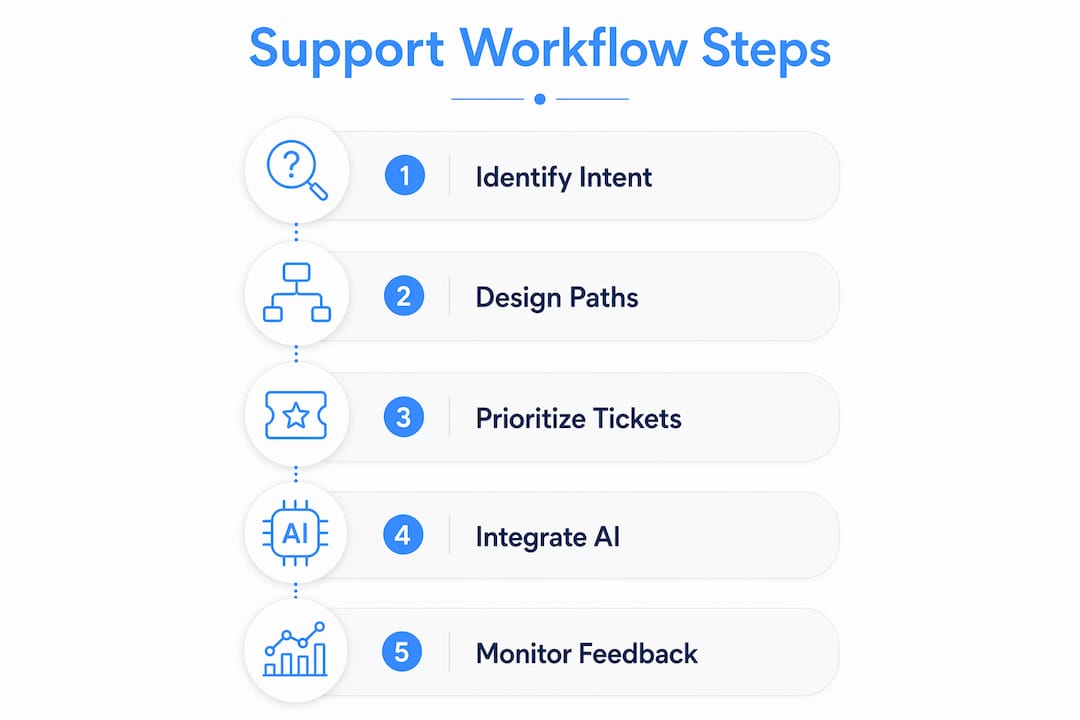
The starting point is intent matching. Chatbot responses should match the user’s intent stage — whether that is pre-sales enquiry, technical support, or billing — rather than defaulting to generic FAQ logic. A visitor asking about pricing needs a different response path than a customer reporting a login error. Treating both the same way produces irrelevant answers and high abandonment rates.

Pro Tip: Map your three most common support request types before building any conversation flow. Design a dedicated path for each one, with a clear escalation point. This alone eliminates the majority of chatbot dead-ends.
Suggested prompts and progressive disclosure are two design techniques that significantly improve user experience. Replacing long text prompts with clickable suggested buttons reduces abandonment and makes the chatbot feel intuitive rather than demanding. Progressive disclosure means showing users only the information they need at each step, rather than presenting every option upfront.
Escalation rules are non-negotiable. Every automated flow must have a defined exit point where a human agent takes over. Without this, complex queries loop endlessly through automation, and customers leave. Clear scope boundaries — what the bot handles versus what it escalates — keep the experience predictable and trustworthy.
Common workflow design mistakes to avoid:
- Building flows that engage users without resolving their actual query
- Failing to disclose the bot’s capabilities upfront, which sets false expectations
- Ignoring transcript data when refining conversation paths
- Designing for the average query while neglecting edge cases that frustrate real customers
What are the steps to implement AI-driven support automation?
Deploying AI support automation is a structured process, not a plug-and-play exercise. Skipping prerequisites leads to a bot that confidently gives wrong answers, which is worse than no bot at all.
Prerequisites checklist before you begin:
- Document your top 30–50 frequently asked questions with accurate, approved answers
- Confirm API access between your chosen platform and your CRM or helpdesk
- Define escalation criteria: which query types must always reach a human agent
- Assign one internal owner responsible for maintaining the AI assistant’s knowledge base
- Set baseline metrics: current average response time, ticket volume, and resolution rate
Implementation steps:
- Import your knowledge base into the AI platform. Structure content by topic category, not by document type.
- Train the AI on your specific business terminology, product names, and common customer phrasing.
- Build conversation flows for your top intent categories, with suggested prompts at each decision point.
- Configure escalation and fallback rules. Neglecting escalation leads to poor user experience and customer frustration.
- Run internal testing with your support team acting as customers. Document every failure point.
- Launch in a limited environment — one page or one customer segment — before full deployment.
- Monitor early metrics weekly: first response time, ticket deflection rate, and escalation frequency.
| Metric | What to measure | Target benchmark |
|---|---|---|
| First response time | Time from query submission to first reply | Under 60 seconds for automated responses |
| Ticket deflection rate | Percentage of queries resolved without human agent | 50%+ within the first 90 days |
| Escalation rate | Percentage of chats handed to a human | Track for quality, not minimisation |
| Customer satisfaction score | Post-interaction rating | Improvement over pre-automation baseline |
Automation handles ticket routing, prioritisation, and basic issue resolution, freeing human agents for personalised service. This division of labour is the core efficiency gain. Your team stops answering the same question 40 times a day and starts solving the problems that actually need their expertise. For more on how AI development accelerates this kind of growth, the Cloudfusion article on AI web development covers the broader business case well.
How to troubleshoot common mistakes in website support automation
Even well-planned support automation runs into problems. The most common issues are over-automation, poor escalation design, and neglecting the feedback loop that keeps AI accurate over time.
Over-automation happens when businesses push too many query types through the bot before it is ready. The result is a high volume of incorrect or irrelevant responses. The fix is simple: start with a narrow scope covering your most predictable queries, then expand as the system proves reliable.
Pro Tip: Review 20 chat transcripts every week for the first three months after launch. You will spot patterns in failed queries faster than any dashboard will show you.
Regular transcript review and updates informed by user interactions are vital to maintaining AI assistant accuracy. One designated owner per assistant function improves consistency and speeds up updates. Without this ownership, the knowledge base drifts out of date and customer trust erodes.
Key troubleshooting practices:
- Set a chatbot fatigue threshold. If a user asks the same question three times without resolution, trigger an automatic escalation to a human agent.
- Audit escalation paths monthly. Confirm that handoffs to live agents work correctly across all devices and browsers.
- Update the knowledge base after every product change, pricing update, or policy revision. Stale information is the single biggest driver of chatbot distrust.
- Disclose bot capabilities clearly at the start of every conversation. Small UI details like clear capability disclosure determine whether users trust and repeatedly use support bots.
The human backup layer is not optional. Automation improves efficiency, but customers facing complex or emotionally charged issues need a person. Businesses that remove human escalation entirely see satisfaction scores drop sharply. The goal is a system where automation handles volume and humans handle nuance. Partnering with specialists in custom AI web applications can help you design this balance correctly from the start. For businesses looking at how automation fits into broader digital growth, Nils Digital offers useful frameworks on reducing manual support tickets through structured automation.
Key takeaways
Effective website support automation requires a unified platform, precise conversation design, and a consistent feedback loop to stay accurate and trustworthy.
| Point | Details |
|---|---|
| Unify your tools | A single platform combining AI chat, live chat, and ticketing outperforms separate tools. |
| Match intent, not just keywords | Design conversation flows around user intent stages to reduce irrelevant responses. |
| Build escalation in from day one | Every automated flow needs a clear human handoff point to prevent customer frustration. |
| Assign one knowledge base owner | A single owner per AI function keeps content accurate and updates consistent. |
| Measure deflection, not just speed | Track ticket deflection rate alongside response time to assess real automation value. |
Where I’ve seen website support automation go wrong
Having worked closely with South African businesses deploying AI support tools, the pattern I see most often is this: teams invest in the technology and then underinvest in the design and maintenance that makes it work.
The technology is not the hard part. A well-configured AI assistant can genuinely reduce human ticket volume by 70% and cut support costs per conversation by 80%. Those numbers are real. But they require a knowledge base that is accurate, conversation flows that match actual user behaviour, and a team that reviews transcripts regularly. Most early projects skip at least one of these.
The other mistake I see is treating automation as a cost-cutting exercise rather than a service improvement. When the primary goal is reducing headcount rather than improving customer experience, the design decisions reflect that. Escalation paths get removed. Scope gets expanded too fast. Customers notice immediately. The businesses that get this right are the ones that frame automation as a way to give their human agents better problems to solve, not as a way to eliminate them.
My honest recommendation: start smaller than you think you need to. A bot that handles 10 query types well is worth more than one that handles 50 query types poorly. Build confidence in the system before expanding its scope. Your customers will tell you when it is ready for more.
— Anton
How Cloudfusion can help you build better website support
Cloudfusion builds custom web development solutions that integrate AI chat, automated ticketing, and self-service portals directly into your website architecture. The team understands the South African market context, including the need for multilingual support, local hosting performance, and integration with the tools your business already uses. Whether you are starting from scratch or upgrading an existing support setup, Cloudfusion designs systems that match your actual customer journey rather than a generic template. Give us a shout to discuss your project requirements and get a tailored quote.
FAQ
What does streamlining website support actually mean?
Streamlining website support means replacing slow, manual customer service processes with structured automation, AI tools, and clear workflows that deliver faster, more consistent responses. The goal is fewer delays, lower costs, and higher customer satisfaction.
How much can AI reduce my website support workload?
AI-powered support agents can reduce human ticket volume by 70% and cut support costs per conversation by 80%, with first response times dropping from hours to seconds. Results depend on knowledge base quality and conversation design.
Do I still need human agents if I automate website support?
Human agents remain essential for complex, sensitive, or emotionally charged queries that automation cannot resolve well. The best setups use AI to handle volume and human agents to handle nuance, with clear escalation rules connecting the two.
What is the biggest mistake businesses make with support automation?
The most common mistake is expanding the chatbot’s scope too quickly before the knowledge base is accurate and the conversation flows are tested. Starting with a narrow, well-defined set of query types produces far better outcomes than trying to automate everything at once.
How do I measure whether my website support automation is working?
Track first response time, ticket deflection rate, escalation frequency, and customer satisfaction scores. Improvement across all four metrics indicates the system is working. A rising escalation rate with falling satisfaction scores signals a conversation design problem that needs attention.
Recommended