UX web developer: what your business needs to know
Discover how a UX web developer can elevate your website's performance. Learn why this role is crucial for your business success!
Start reading
TL;DR:
- A UX web developer bridges design and coding by transforming user research, wireframes, and prototypes into functional, accessible, and responsive websites. They collaborate with stakeholders to ensure optimal user experience, build semantic HTML, and implement mobile-first strategies that improve conversions and expand reach. Integrating accessibility from the start reduces costs and creates websites that work effectively across all devices and user needs.
Most businesses assume their website needs a designer or a developer, as if the two are entirely separate concerns. A skilled UX web developer, the industry’s term for a front-end practitioner who merges user experience strategy with technical implementation, proves that assumption wrong. This role sits at the intersection of user interface design, accessibility, and coded interfaces, making it one of the most commercially valuable positions in modern web development. Understanding what this professional does, and why it matters for your bottom line, is the first step to building a website that genuinely works for your customers.
Table of Contents
- Key takeaways
- What a UX web developer actually does
- Accessibility and semantic HTML
- Responsive design and cross-device experience
- Collaboration with business stakeholders
- How to hire the right UX web developer
- My take on the UX developer’s real value
- Work with Cloudfusion on your next web project
- FAQ
Key takeaways
| Point | Details |
|---|---|
| UX developers bridge design and code | They translate wireframes and prototypes into functional, responsive interfaces that serve real users. |
| Accessibility is non-negotiable | Building semantic HTML and ARIA compliance in from the start reduces costs and expands your market reach. |
| Responsive design drives revenue | Mobile-first approaches directly influence conversion rates, retention, and customer satisfaction. |
| Collaboration multiplies impact | UX developers working closely with designers, marketers, and product owners produce measurably better outcomes. |
| Hiring right requires scrutiny | Portfolios demonstrating both UX thinking and technical execution are the clearest signal of genuine capability. |
What a UX web developer actually does
People often confuse the roles of a UI UX designer and a front-end developer, assuming the two are interchangeable or that one person cannot credibly occupy both spaces. The reality is more nuanced. A UX web developer holds a distinct position: they conduct user research, create wireframes and prototypes, and then translate those into responsive code that maintains design fidelity across every device and browser.
The day-to-day responsibilities are broader than most business owners expect. A skilled practitioner in this role will:
- Conduct UX research methods such as user interviews, usability testing, and competitive analysis to inform design decisions
- Build and iterate on wireframes and interactive prototypes using tools like Figma, Axure, or Balsamiq
- Convert designs into semantic HTML, CSS, and JavaScript, including interactive behaviours like modal dialogs and form validation
- Collaborate directly with UI designers, back-end developers, marketers, and product owners
- Apply accessibility standards (WCAG, ARIA) and test across real browsers and devices, not just emulators
- Maintain design consistency and performance as a site grows
The frontend developer skills required go well beyond visual taste. Proficiency in CSS layout systems like Flexbox and Grid, JavaScript frameworks, version control with Git, and performance optimisation are all part of the toolkit. What separates this role from a pure front-end developer is the continuous focus on user experience strategies, not just technical correctness.
Pro Tip: When reviewing a candidate’s portfolio, look specifically for case studies that show the journey from research insight to coded solution. Anyone can show a finished screen. The UX developer who explains why decisions were made at each stage is the one who will solve problems your team hasn’t anticipated yet.
Accessibility and semantic HTML
Here is something most businesses discover too late: accessibility is not a feature you add at the end of a project. It is a structural decision baked into every line of code from the first day of development. A competent UX web developer understands this instinctively, and it is one of the clearest markers separating genuine practitioners from those who only understand the surface of the role.
The foundation begins with semantic HTML. When you use the correct native HTML elements — "
The practical implications of getting this wrong are significant. Consider the following common pitfalls:
- Misusing ARIA roles on native elements. Patching native elements with ARIA often breaks keyboard interactions and produces incorrect screen reader announcements, leaving users stranded on your page.
- Ignoring keyboard navigation. Interactive elements unreachable by keyboard cause screen reader navigation to fail entirely, cutting off users who rely on assistive technology.
- Invisible focus indicators. Removing the browser’s default focus outline without providing a visible alternative creates a site that keyboard users simply cannot operate.
- Broken focus order in custom components. Custom interactive components like dropdowns, date pickers, and modals require explicit focus management so that keyboard focus follows a logical, predictable path through the interface.
“Using the right semantic HTML elements provides accessibility for free, supplemented by ARIA only as needed. Starting with native HTML semantics is critical since ARIA cannot always replicate keyboard behaviour and screen reader announcements.” — Grizzly Peak Software
The commercial case for accessibility extends beyond compliance. In South Africa, a significant portion of internet users access the web on lower-spec devices or in environments where assistive technology is present. Building accessibility into workflows from the start reduces remediation costs and expands your effective audience. It also improves overall usability for everyone, because the web design principles that make a site accessible, clear labels, logical structure, predictable navigation, make it easier to use for all visitors.
Responsive design and cross-device experience

A website that looks perfect on a desktop and breaks on a mobile phone is not a website, it is a liability. Responsive web design is the practice of building interfaces that adapt to any screen size, input method, or device capability. A skilled practitioner in this space understands that responsive front-end code is not just about making things smaller. It is about re-prioritising content, simplifying navigation, and ensuring that touch interactions work as intuitively as mouse clicks.
The core techniques involved in responsive development include:
- CSS media queries that adjust layout, typography, and spacing at defined breakpoints
- Flexible grid systems using CSS Grid or Flexbox to create fluid layouts rather than fixed pixel widths
- Fluid images and media that scale within their containers without overflow or distortion
- Mobile-first development, where the base stylesheet targets small screens and complexity is added progressively for larger viewports
The business case for mobile-first approaches is well documented. Globally, mobile devices account for over half of all web traffic, and South African browsing patterns lean even more heavily towards mobile due to the dominance of smartphone internet access in the country.
| Approach | User experience outcome | Business impact |
|---|---|---|
| Desktop-first only | Poor mobile usability, high bounce rates | Lost revenue, lower search rankings |
| Responsive, desktop-first | Acceptable mobile experience with compromises | Moderate conversion performance |
| Mobile-first responsive | Optimised for dominant user behaviour | Higher conversions, better retention |
| Adaptive with real device testing | Consistent experience across all devices | Maximum reach and customer satisfaction |
Testing across real devices matters more than most teams acknowledge. Emulators in browser developer tools are useful for rapid iteration, but they miss nuances like touch target sizing, font rendering on specific operating systems, and performance characteristics of mid-range Android handsets common in South Africa. A rigorous UX developer tests on physical devices and uses tools like BrowserStack to cover the full spread. You can read more about the conversion impact of responsive design and why it pays off at scale.
Collaboration with business stakeholders
A UX developer who only communicates in technical terms is a liability in a business project. The role demands fluency in two languages simultaneously: the language of design thinking and the language of code. This dual fluency is what makes skilled practitioners so effective when working alongside marketing teams, product owners, and executive stakeholders.
Within the software development lifecycle, UX developers sit at a critical point. They receive design assets from UI designers and convert them into working interfaces, while simultaneously flagging technical constraints that could affect the design before a single pixel is built. This prevents the costly back-and-forth that occurs when design and development operate as disconnected silos.
Effective collaboration in practice looks like this:
- Participating in sprint planning and backlog grooming to provide technical estimates alongside UX context
- Running usability testing sessions and feeding findings directly into development iterations
- Communicating clearly to non-technical stakeholders why a design change might affect load time or accessibility compliance
- Working with marketers on user interface design decisions that influence conversion pathways
The measurable outcomes of this collaboration are concrete. Websites developed with integrated UX and technical ownership consistently show improvements in conversion rates, reduced support tickets related to usability confusion, and higher customer satisfaction scores. The link between UX investment and customer retention is particularly strong for subscription and e-commerce businesses where repeat visits drive revenue.
Pro Tip: Ask your UX developer to present findings from even small usability tests before major design decisions are locked in. Three users testing a checkout flow for 20 minutes will reveal more actionable problems than weeks of internal debate about button colour.
How to hire the right UX web developer
Hiring in this space requires more precision than most job posts reflect. Titles like “UI UX designer,” “front-end developer,” and “UX developer” are used interchangeably in job markets, but the capabilities they imply differ substantially. Before you post a position or brief a digital agency, it is worth clarifying exactly what your project requires.
| Role | Primary strength | Typical gap |
|---|---|---|
| UI UX designer | Visual design and user research | May not write production code |
| Front-end developer | Coded interface implementation | May not conduct UX research or accessibility audits |
| UX web developer | Combines research, design, and front-end code | Rarer, commands higher rates, higher ROI |
When evaluating candidates, focus on the following:
- Portfolio depth over breadth. Look for projects that document the UX process, from research insight through wireframe to coded output, not just finished screenshots.
- Accessibility evidence. Ask specifically whether their projects have been tested with screen readers. A candidate who can describe a real accessibility fix they implemented is worth far more than one who lists “WCAG” on a CV.
- Responsive design approach. Ask how they approach cross-device testing. The answer tells you whether they are methodical or ad hoc.
- Collaboration track record. Ask for examples of how they communicated technical constraints to a non-technical client or stakeholder. Communication skill is a technical skill in this role.
- Tool familiarity. Proficiency with Figma for handoff, combined with modern HTML, CSS, and JavaScript capability, is the baseline. Experience with accessibility testing tools like Axe or Lighthouse is a strong differentiator.
Explore web usability resources to sharpen your understanding of what good UX implementation looks like before you begin the hiring process.
My take on the UX developer’s real value
In my experience, businesses consistently underestimate what they are getting when they hire someone who bridges design and development. The conversation usually starts with “we need a website redesign,” and the instinct is to engage a designer first and a developer second, as if the two phases are entirely sequential.
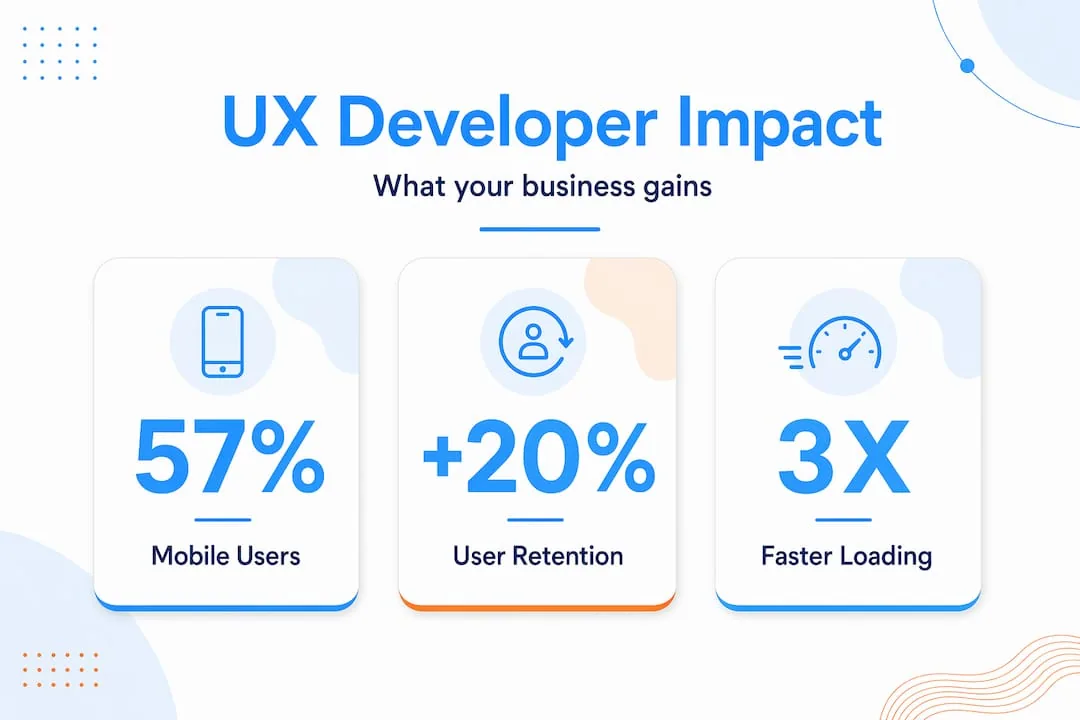
What I have found working with clients across different sectors is that the costliest problems always emerge in the handover between design and code. A design looks perfect in Figma and falls apart in the browser because nobody with development knowledge was involved in the design decisions. That gap is where an integrated UX web developer earns their value many times over.
The accessibility piece is where I see the most avoidable waste. Teams spend significant budget on design work, then discover during a compliance review that the entire component library needs to be rebuilt because it was never semantically correct. Getting accessibility right from day one is not a luxury, it is the more economical path. I would encourage any business planning a website project in 2026 to treat the UX developer not as a finishing step, but as a foundational partner from the moment discovery begins.
— Anton
Work with Cloudfusion on your next web project
If this guide has clarified what you need from your website, Cloudfusion can help you act on it. Our team specialises in custom web development with UX and front-end expertise built in from the start, covering accessibility compliance, responsive design, and user experience strategy. We work with businesses and startups across South Africa to deliver websites that perform for real users on real devices. Whether you are building from scratch or improving an existing platform, give us a shout and let us chat about what your project needs. Visit our portfolio or request a consultation to get started.
FAQ
What does a UX web developer do?
A UX web developer conducts user research, builds wireframes and prototypes, and converts designs into code including HTML, CSS, and JavaScript. They focus on accessibility, responsive design, and ensuring the final product works correctly for all users across devices.
How is a UX developer different from a UI UX designer?
A UI UX designer typically focuses on visual design and user research without necessarily writing production code. A UX developer combines those skills with the technical ability to build the interfaces they design, closing the gap between concept and working product.
Why does accessibility matter for my business website?
Accessibility built into development from the start reduces remediation costs, expands your potential audience, and improves overall usability for every visitor. It also reduces legal compliance risk as digital accessibility standards are enforced more widely.
What frontend developer skills should I look for when hiring?
Look for proficiency in semantic HTML, CSS layout systems, JavaScript, responsive design implementation, and accessibility testing tools like Axe or Lighthouse. Candidates should also demonstrate UX research methods and the ability to communicate design decisions clearly to non-technical stakeholders.
How does responsive web design affect business outcomes?
Mobile-first responsive design directly improves conversion rates, reduces bounce rates on mobile devices, and supports better search engine rankings. For South African businesses where smartphone browsing dominates, a mobile-first approach is not optional, it is commercial necessity.