TL;DR:
- Most hosting failures in SMEs occur due to overlooking ongoing performance evaluation rather than initial setup issues. Regular benchmarking, re-provisioning, and continuous monitoring ensure scalable and reliable website performance under increased traffic. An institutional discipline of reviewing configuration and performance data enables sustained fast, stable site operations.
Your business website just crashed during your biggest promotional campaign of the year. Traffic spiked, response times ballooned, and thousands of potential customers left before a single page loaded. This is not a hypothetical scenario for many growing businesses — it is a recurring, costly reality that stems directly from underconfigured hosting environments. The good news is that a structured, disciplined configuration process prevents exactly this outcome. This guide walks you through prerequisites, phased setup, benchmarking, troubleshooting, and outcome verification so your hosting environment scales reliably under pressure.
Table of Contents
- Prepare for a successful hosting configuration
- Step-by-step web hosting configuration process
- Test and benchmark your configuration for scalability
- Troubleshoot and tune for optimal performance
- What most guides miss about hosting configuration
- Unlock reliable hosting with Cloudfusion
- Frequently asked questions
Key Takeaways
| Point | Details |
|---|---|
| Benchmark for growth | Run realistic load tests to ensure your hosting supports business scalability. |
| Prioritize repeatability | Use identical software stacks and re-provision servers for accurate, actionable benchmarks. |
| Tune and monitor continuously | Ongoing monitoring and tuning catch bottlenecks before they harm performance. |
| Avoid set-and-forget errors | Treat configuration as an evolving process, not a one-time project. |
Prepare for a successful hosting configuration
Before diving into setup, it is essential to map out your goals and environment needs. Skipping this stage is like provisioning infrastructure blindly, and the gaps will surface at the worst possible moment.
Start by defining your business goals in concrete, measurable terms. What peak concurrent user count do you realistically expect? What uptime target have you committed to — 99.9% or 99.99%? What content management system (CMS) or application framework does your site depend on? These answers directly shape every resource allocation and configuration decision you will make. Understanding choosing hosting for business requirements upfront prevents expensive retrofitting later.
Next, document your software stack in full detail. This includes your operating system version, web server type (Apache, Nginx, or LiteSpeed), PHP or runtime version, database engine, and any active plugins or modules. Environment consistency is not optional — it is foundational. Knowing the importance of web hosting decisions means recognising that a mismatch between development and production environments introduces unpredictable behaviour under load.
Key preparation checklist
- Traffic projections: Baseline monthly visits, expected campaign spikes, and seasonal peaks
- Uptime and SLA targets: Define acceptable downtime in minutes per month
- Stack documentation: OS, web server, CMS version, PHP version, database engine
- Benchmarking scope: Identify which pages or endpoints are most business-critical
- Monitoring baseline: Establish pre-configuration time to first byte (TTFB) and uptime readings
Hosting type selection matrix
| Hosting type | Best for | Scalability | Management overhead |
|---|---|---|---|
| Shared hosting | Low-traffic brochure sites | Low | Low |
| VPS hosting | Growing SME applications | Medium | Medium |
| Cloud hosting | Variable or high-traffic sites | High | Medium |
| Dedicated server | High-resource, predictable load | High | High |
For most small to medium enterprises (SMEs) with growth ambitions, managed hosting options offer a practical balance between control and operational overhead.

Pro Tip: Set up a standardised test environment that mirrors your production stack exactly, including identical CMS versions and plugins. According to Web Hosting Benchmarks 2026, benchmarking with fixed app and software versions using realistic workloads — measuring TTFB and uptime under ramping concurrency — produces the only results that reliably predict production behaviour.
Step-by-step web hosting configuration process
With requirements and your environment mapped, you are ready to configure step by step. This sequence is designed to minimise rework and ensure each layer is stable before the next is applied.
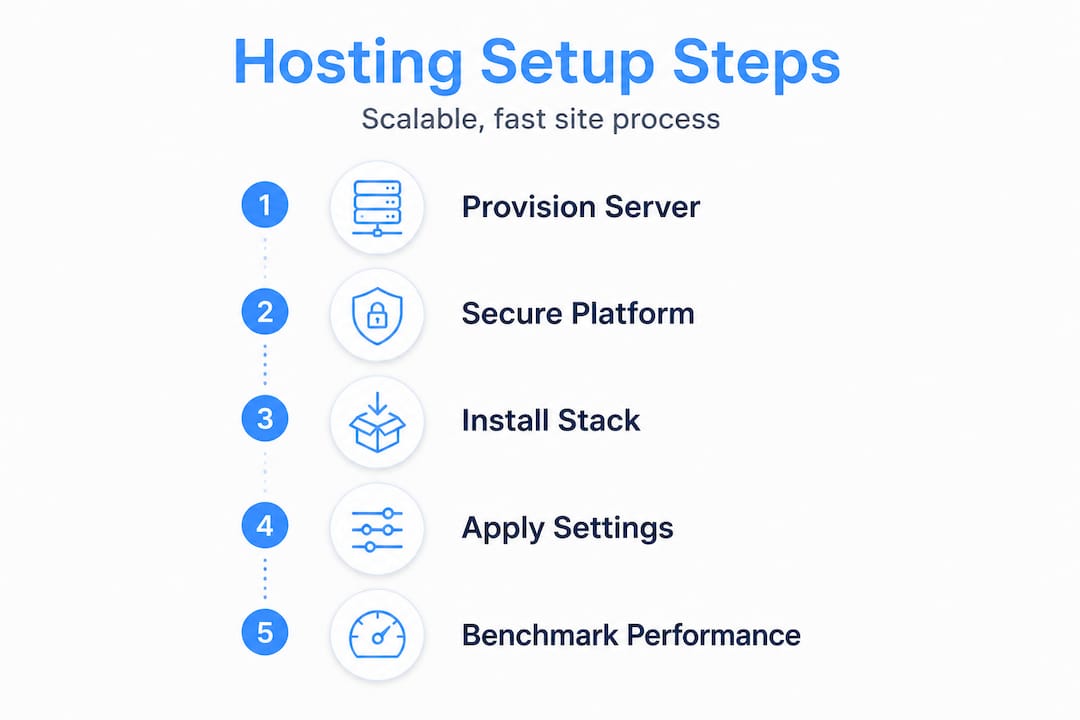
The core configuration sequence follows a logical order: provision first, secure second, install your stack third, apply policy (firewalls and backups) fourth, deploy your application fifth, and then optimise for expected load last. Deviating from this order, particularly deploying an app before securing the environment, creates compounding risks that are difficult to unravel later.
The choice between manual configuration and automated, scripted setup is strategic. Manual setup gives granular control and is appropriate for single-server environments or when learning the stack deeply. Scripted or container-based setups (using tools like Ansible, Docker, or Terraform) add repeatability, which becomes critical when you need to re-provision for accurate benchmarking or scale horizontally. For SMEs evaluating cloud hosting options, automation is increasingly the standard, not the exception.
Configuration steps in sequence
- Provision the server: Select region, allocate CPU, RAM, and storage based on your stack requirements. Use SSD storage wherever possible.
- Harden access: Create non-root user accounts, configure SSH key authentication, and disable password-based login.
- Set up networking: Configure static IP or elastic IP, set up DNS records, and implement reverse DNS where required.
- Install the web stack: Deploy your web server (Nginx or Apache), runtime (PHP, Node.js), and database (MySQL, PostgreSQL). Use version-pinned package installs.
- Apply security policies: Configure UFW or iptables firewall rules, install SSL certificates via Let’s Encrypt, and set up automated backups.
- Deploy the application: Pull your codebase from a version-controlled repository, run database migrations, and set correct file permissions.
- Optimise for load: Enable server-level caching (OPcache, Varnish), configure gzip compression, and tune database connection pools.
Manual vs. automated configuration comparison
| Factor | Manual configuration | Automated (scripted/container) |
|---|---|---|
| Setup speed | Slow, step by step | Fast, repeatable |
| Consistency | Prone to human error | Highly consistent |
| Re-provisioning for benchmarks | Labour intensive | Simple, reliable |
| Skill requirement | Deep server knowledge | Infrastructure-as-code knowledge |
| Recommended for | Learning, single instances | Production SME environments |
Understanding the difference between cloud vs traditional hosting environments also informs whether automation tools like Terraform or cloud-native scaling policies are available to you. Understanding this distinction early shapes your entire configuration approach.
Pro Tip: Use infrastructure-as-code scripts to define your entire server state. This makes re-provisioning for accurate benchmark comparisons straightforward, and it aligns with the guidance in Web Hosting Benchmarks 2026 to use load testing tools like k6 with ramping concurrency to observe performance degradation as traffic increases.
When selecting a choosing a hosting provider, verify that the provider supports the automation and scripting tools your team will use. Provider-level limitations on deployment tooling can block repeatable configuration entirely.
Test and benchmark your configuration for scalability
Once the server is configured, verifying its limits ensures reliability as user numbers grow. A configuration that performs well under light load can degrade catastrophically at 200 concurrent users — and you need to know this before your customers discover it.
The benchmark process starts with environment control. Deploy identical application instances, with the same CMS version, the same set of active plugins, and the same database content across every test run. This removes variables that could skew results and make your data meaningless. As arXiv Preprint 2504.11826 confirms, cloud and container benchmarks often vary considerably, and reusing infrastructure without re-provisioning can reduce accuracy when measuring small performance differences.
“Benchmarking without controlling environment variability is not benchmarking — it is guessing. Re-provision your infrastructure between significant test cycles to eliminate hidden state and ensure your results reflect reality, not residual noise.”
Load testing steps for scalability verification
- Baseline test: Run a single-user test to confirm correct application behaviour and establish a clean TTFB baseline.
- Ramp-up test: Gradually increase concurrent users (for example, 10, 25, 50, 100, 200) using a tool like k6. Record TTFB and error rates at each step.
- Sustained load test: Hold a target concurrency for a defined period (15 to 30 minutes) to surface memory leaks, database connection exhaustion, or cache saturation.
- Spike test: Simulate sudden traffic surges to test auto-scaling policies or observe maximum degradation before failure.
- Re-provision and repeat: Re-provision the server environment and rerun tests to confirm consistency and catch infrastructure-level variation.
The Web Hosting Benchmarks 2026 methodology recommends measuring dynamic page TTFB and uptime under realistic, ramping workloads rather than synthetic static-file requests. Testing your load testing for web apps under conditions that mirror actual user behaviour gives far more actionable data.
Sample scalability benchmark results table
| Concurrent users | Avg. TTFB (ms) | Error rate (%) | Server CPU (%) | Status |
|---|---|---|---|---|
| 10 | 180 | 0 | 12 | Healthy |
| 50 | 310 | 0 | 38 | Healthy |
| 100 | 620 | 0.5 | 71 | Warning |
| 150 | 1,450 | 4.2 | 94 | Critical |
| 200 | Timeout | 18.7 | 100 | Failed |
This table illustrates a common degradation pattern. The transition from 100 to 150 concurrent users reveals the scaling threshold clearly. Without this data, you would have no idea where your configuration breaks. With it, you can make informed decisions about upgrading resources, implementing caching layers, or adding load balancing before users are affected.
Troubleshoot and tune for optimal performance
After initial deployment and testing, ongoing monitoring and tuning keep sites running at their best. Configuration is never truly finished — it requires continuous evaluation as your application evolves and traffic patterns shift.
The first layer of tuning addresses monitoring coverage. Without reliable visibility into uptime and TTFB, you are responding to outages rather than preventing them. Tools like UptimeRobot and Pingdom provide continuous automated monitoring, alerting your team before users notice degradation. As Web Hosting Benchmarks 2026 emphasises, measuring TTFB and uptime as primary performance indicators gives the clearest signal of real-world hosting health.
Common performance issues and tuning actions
- High load latency: Review database query execution times, implement query caching, and consider read replicas for high-read workloads
- Resource exhaustion: Profile PHP-FPM worker counts, adjust MySQL connection pool limits, and increase PHP memory limits where justified
- Cache misunderperformance: Verify OPcache hit rates are above 90%, configure object caching (Redis or Memcached), and review full-page cache invalidation logic
- Security misconfigurations: Audit open ports regularly, rotate SSL certificates before expiry, and enforce HTTP Strict Transport Security (HSTS) headers
- Slow static asset delivery: Offload static files and media to a content delivery network to reduce origin server load and improve global load times significantly
- Database bottlenecks: Add appropriate indexes, archive stale data, and schedule OPTIMIZE TABLE operations during low-traffic windows
The CDN layer deserves particular attention for SMEs with geographically distributed audiences. Implementing a CDN does not just improve speed — it absorbs a significant share of concurrent requests that would otherwise hit your origin server, directly extending your effective scalability ceiling without additional server provisioning.
Pro Tip: After any configuration change, whether a plugin update, a PHP version upgrade, or a server resource adjustment, repeat your standardised benchmark tests. Small, incremental changes can accumulate into significant performance regression if left unchecked across multiple deployment cycles.
What most guides miss about hosting configuration
Here is an uncomfortable truth that most technical guides sidestep: the majority of hosting performance failures at SME level are not caused by poor initial configuration. They are caused by treating configuration as a launch event rather than an ongoing operational discipline.
Teams invest significant effort in the initial setup, document the process thoroughly, and then never revisit it. Six months later, a plugin update changes PHP memory behaviour, a new feature increases database query complexity, and traffic doubles after a successful marketing campaign. Nobody re-benchmarks. Nobody notices the TTFB climbing from 280ms to 950ms. Then one afternoon, during a live webinar or product launch, the site buckles.
The insight from arXiv Preprint 2504.11826 is particularly relevant here: cloud and container infrastructure is especially prone to subtle performance shifts unless environments are regularly re-provisioned and re-evaluated. Cloud providers update underlying hardware, hypervisor configurations, and network topology without notice. What performed at a certain level in January may perform meaningfully differently in July on the same nominal instance type.
The teams that consistently maintain fast, stable sites approach configuration as a living process with scheduled review cycles. They re-run their benchmark suite quarterly, after major application updates, and after any infrastructure change. They treat performance data as a trend to be monitored, not a one-time checkbox. Reviewing the cloud hosting impact on long-term performance consistency reinforces why this ongoing discipline is non-negotiable for growing businesses.
The real competitive advantage is not the perfect initial configuration. It is the institutional habit of verifying that configuration still performs as intended, every single time something changes.
Unlock reliable hosting with Cloudfusion
With a strategic configuration process and ongoing tuning discipline in place, the right hosting partner elevates your results even further. At Cloudfusion, our web hosting packages are purpose-built for SMEs that need reliable, scalable environments without the overhead of managing infrastructure from scratch. From initial provisioning to ongoing performance support, we apply the same structured, benchmarking-driven approach outlined in this guide. Our custom web development team also ensures your application is optimised at the code level, so configuration and codebase work together to deliver consistently fast experiences. Contact Cloudfusion today to discuss a hosting setup that scales with your business.
Frequently asked questions
How can I tell if my hosting setup is scalable?
Regularly benchmark performance by incrementally increasing concurrent users and monitoring TTFB and error rates at each step — a scalable setup maintains acceptable response times without error spikes as load grows.
What is the most common mistake in configuring web hosting?
Skipping re-benchmarking after changes is the most damaging oversight, since infrastructure variability in cloud environments means performance can shift meaningfully after updates, leaving sites vulnerable to degradation that nobody has measured.
Which tool is best for load testing web servers?
k6 is a leading tool for scalability testing, specifically designed for ramping concurrency tests that reveal exactly where server performance degrades under increasing user load.
Should I re-provision servers before benchmarking changes?
Yes. Re-provisioning eliminates hidden infrastructure state and drift, and as environment variability research confirms, this step is essential for producing accurate, repeatable benchmark results on cloud or container-based platforms.
How do I monitor uptime and TTFB efficiently?
Automated monitoring tools like UptimeRobot and Pingdom provide continuous tracking, and pairing them with periodic load-based benchmarks gives you both real-time alerts and trend data for long-term hosting health.
Recommended