A web app people can open.
Use a browser-based product for accounts, bookings, shared information or repeatable tasks. ViaVia shows this approach in a working mobile web app.
BROWSER-BASED DELIVERY

We plan, design and build web apps for businesses and founders. Define a useful first release, work through the screens and connect the accounts, payments and tools behind it. Based in George, South Africa; working locally and remotely.
Discuss your app See a working appA first release with an agreed scope. Device features, offline work and app-store distribution are assessed before we recommend a delivery approach.
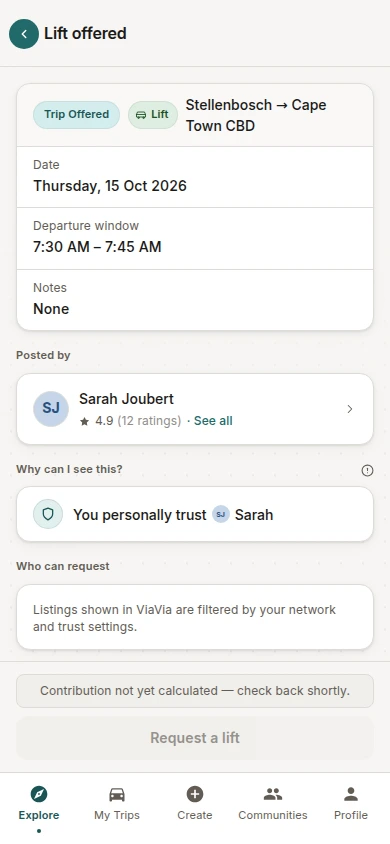
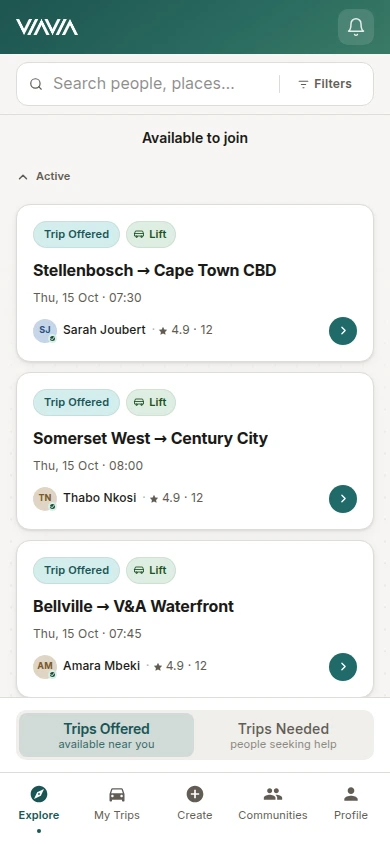
ViaVia began as a community travel idea. We planned and built its brand, public website and mobile web app with the client. Members can find or offer trips, request a lift and coordinate an accepted journey in private chat.
This is a delivered mobile web app. The screens and tour use demo data; they do not represent an Apple App Store or Google Play release.
Explore the ViaVia project“I highly recommend … the Cloudfusion team to anyone looking for a skilled, reliable, and proactive developer.”
24-second screen tour · Actual app screens with demo data · No audio.
Open the screen tourStart with the people, devices and tasks. The right delivery route depends on the behaviour you need, not just whether something is called an app.
Use a browser-based product for accounts, bookings, shared information or repeatable tasks. ViaVia shows this approach in a working mobile web app.
BROWSER-BASED DELIVERYA progressive web app can add installation and selected device capabilities. We check the intended browser, device and exact behaviour before confirming what is possible.
PWA & DEVICE CHECKSBackground location, offline changes, specialist hardware and store distribution need specific assessment. We agree the technical approach, testing and release responsibilities before including them in the scope.
OFFLINE, HARDWARE & APP STORESDescribe one important task from start to finish. Include the work your team must do behind it, then decide what belongs in the first release.
Identify who uses the app, what each person can see and do, and the result they need. Separate the essential first journey from later ideas.
A brief, priorities and access decisionsWork through screens and a prototype, then review working features. Include missing information, failed connections and the next action when something needs attention.
Reviewed designs and working featuresAgree acceptance checks, accounts, handover and the launch route. Define who maintains the app and which further changes or support are quoted separately.
A release plan and agreed responsibilitiesThe quote follows the first-release requirements. If paid discovery is needed, we agree its scope and fee before it starts.
User roles, screens, integrations, administration, information to move and device requirements all affect the work. A prototype, a first live release and an app-store submission are different deliverables.
Hosting, third-party subscriptions, usage charges and any store-account fees are identified separately where they apply. Support and later features have an agreed scope and cost.
The agreement confirms the source code, editable materials and documentation included, alongside ownership and licence terms. We agree who manages hosting, connected services and any distribution accounts.
Need a customer portal or an internal business system?
Explore the wider software serviceWe quote for the agreed first release: the user journeys, accounts, screens, administration and connections it needs. Device-specific work and distribution can change that scope. We identify development, hosting, subscriptions and support separately; a useful first conversation starts with what the app must do.
Yes. A prototype can help review the screens and steps before a larger build. A first live release can focus on the essential journey and the administration needed to operate it. We agree what that stage proves, what it includes and its fee before starting.
An app-store release is a separate delivery requirement, rather than an automatic part of a web-app build. We assess the device capabilities, distribution route, account ownership, review requirements and maintenance before proposing the scope. ViaVia, shown here, is a mobile web app; its tour is not evidence of an app-store release.
Tell us which information people need to see and which actions they must complete without a connection. We then check what can be stored on the device, how changes return to the system and how conflicts or failed transfers should be handled. Offline behaviour needs testing on the intended devices; it is not assumed for every app.
Describe who will use the app, the main task they need to finish and the tools or information involved. Tell us about any required device features, offline use, app-store plans, budget or launch constraints. An early idea is enough to begin discussing scope; leave passwords and customer records out of the initial enquiry.
We agree who looks after hosting, application updates, connected services and support. Feedback from actual use can help prioritise later improvements. Ongoing work is defined and quoted separately, so launching the first version does not imply unlimited maintenance or new features.
Who will use it? What should they be able to finish? We’ll use that starting point to discuss the approach and the next useful step.
Discuss your app